A Happy Halloween to everyone out there in the blogosphere!
-
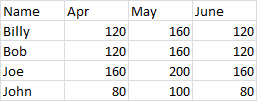
Sometimes you have to work with a data set that is not in a state conducive to, well, anything. I’m thinking specifically about crosstabbed data sets. More than once I’ve had to deal with a data set that looks like this:
Oh, if only there were a way to unwind this file so that it was in a more normalized state for querying, lookups, and general analysis.
Well, now there is.
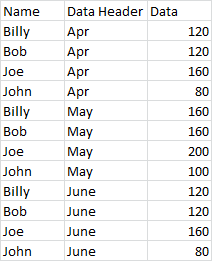
I created this routine a number of years ago because I had a monthly process that required taking a dataset like the one above and reformatting it into a layout that looks like this:
Needless to say, the data I was dealing with was a good deal larger than the sample above. I’ve used this routine on datasets that ended up outputting half a million rows. Yeah, it takes a few minutes, but it works. On smaller datasets, it works pretty fast.
Sub UnWindCrosstabData() ' This takes a cross tabbed data and "unwinds" it to a flat file. ' Variable declarations. Dim rng As Range Dim shNew As Worksheet Dim lCols As Long Dim lRows As Long Dim i As Long Dim j As Long Dim r As Long Dim vTemp As Variant ' If the selection count is greater than one, ' assume a range to uwind has been selected. If Selection.Count > 1 Then Set rng = Selection Else ' Otherwise, use a range input box to get the range via the user. On Error Resume Next Set rng = Application.InputBox("Select the range to be unwound:", , , , , , , 8) ' If we get an error, the user did not select a range, and we exit the sub. If Err.Number <> 0 Then MsgBox "You need to select a range to use this utility.", vbExclamation, "Selection Error" Exit Sub End If On Error GoTo 0 End If ' Get the total number of columns we will be dealing with. lCols = rng.Columns.Count ' Get the total number of rows we'll be dealing with, taking the use ' of headers into account. lRows = rng.Rows.Count - 1 ' Speed up processing by shutting off screen flicker. Application.ScreenUpdating = False ' Set the new worksheet that will house the data. Set shNew = ActiveWorkbook.Worksheets.Add ' Reactivate the source sheet. rng.Parent.Activate ' Select and copy the source range, and paste it into the new sheet. rng.Select rng.Copy shNew.Activate ActiveSheet.Cells(1, 1).PasteSpecial xlPasteValues ' Reset the range to the pasted selection. Set rng = Selection ' Insert a column for the data header. rng.Cells(1, 2).Select Selection.EntireColumn.Insert ' Copy the record identifiers down, taking headers into account. For i = 1 To lCols - 2 rng.Cells(2, 1).Select Range(Selection, Selection.Offset(lRows - 1, 0)).Select Selection.Copy rng.Cells(1, 1).Select Selection.End(xlDown).Select Selection.Offset(1, 0).Select Selection.PasteSpecial Paste:=xlPasteValues, Operation:=xlNone, SkipBlanks _ :=False, Transpose:=False Application.CutCopyMode = False Next i ' Fill in the data header column. rng.Cells(1, 2).Value = "Data Header" r = 2 For i = 1 To lCols - 1 vTemp = rng.Cells(1, i + 2).Value For j = 1 To lRows rng.Cells(r, 2).Value = vTemp r = r + 1 Next j Next i ' Insert a column for the data. rng.Cells(1, 3).EntireColumn.Select Selection.Insert Shift:=xlToRight ' Fill in the data. rng.Cells(1, 3).Value = "Data" r = 2 For i = 0 To lCols - 2 rng.Cells(r, i + 4).Select Range(Selection, Selection.Offset(lRows - 1, 0)).Select Selection.Copy rng.Cells(r + (i * lRows), 3).Select Selection.PasteSpecial Paste:=xlPasteValues Next i ' Delete the unneeded columns rng.Cells(1, 4).EntireColumn.Select Range(Selection, Selection.End(xlToRight)).Select Selection.Delete Shift:=xlToLeft ' Turn screen updating back on. Application.ScreenUpdating = True End SubAnd having posted this, I’m already posting a hack. This routine only deals with one column of data to the left of your values. But what if you have more than one column? What if, for example, in the dataset above, you have name and address and city and state and zip code and email and phone number and…well, you get the idea.
What I do is to concatenate all of these fields together into a single column. I always use a delimiter, and for me, two good delimiters are the pipe (“|”) and the tilde (“~”). Once the field is concatenated and converted to values, I’ll run the routine above, then I’ll use Text To Columns to break all the columns back out again.
Use the above freely* and enjoy. If you have suggestion or find bugs, post in the comments section.
*and at your own risk, I assume no responsibility, legalese legalese legalese
-
This weekend, like many of the weekends during the school year, was a blur. Ballet classes, Sunday school, grocery shopping, etcetera etcetera–the list runs long.
One of the things we did was man a table at the local Farmer’s Market. The town Farmer’s Market has been running for about a month now, and will keep on going until the middle of October. This Saturday was particularly fun because it was “kids vendor” day, the day when the local town kids can make things and sell them. There were the usual suspects of cookies, cupcakes, and Rice Krispy treats. There were also the usual craft-y suspects in the form of loop band bracelets, bead necklaces, and paracord bracelets. There was one little girl selling colored pencil drawings she’d made for $2 a drawing (each came with its own sheet protector–in case you were wondering what all you got for your $2).
The Boy Scouts were there selling popcorn, which, if you’ve never had, is very good. It’s not Girl Scout cookie good, but then again, what is?
Of course, there are other vendors there. Actual, you know, farmers. There were four or five farms represented, selling everything for apples to shallots to meat. (Apparently Boylston had its own meat CSA. Who knew?) There were also other craftsmen/women there as well. One woman was selling handmade soap (we bought a few bars because they smelled so good), there was a vendor selling goods made from alpaca hair, there was a local woodworker selling things like bowls and oil lanterns and pens. I bought a pen because they were just fantastically beautiful.My kids didn’t have anything to sell. Instead, they had been asked to man the table for the local food pantry. The food pantry had been running low on stock and one of the parents of the third graders mobilized an effort to get it restocked. Because of schedules and conflicts, there were a lot of people who could be present at the Farmer’s Market to help collect the dry goods. So we volunteered. And while I can’t say they stood there for four hours taking food donations, they were there to help out for a while and accept food (with their parents there to pick up the slack for when they bolted.)
All in all, it was a great time. The kids had a ton of fun with so many of their friends who were there to buy or sell. And they helped out a local charity. I’m really proud of them.
Check out some of the pictures from the day below.
-
I’ve been running more lately, and it’s because of these shoes. Well, that’s not entirely true. I’ve been running more because I met for a consultation with a trainer at the gym we have at work, and in addition to strength training, she told me to get 35-45 minutes of cardio exercise in three times per week. Since I tend to agree with Denis Leary on the topic of indoor cardio machines such as stairmasters and treadmills and elipiticals (“Have we become gerbils, ladies and gentlemen?”) I decided its going to be hitting the pavement, or doing nothing at all.To do this, I needed new shoes. I’d been running on the old pair for about eight months. I pronate on my right foot, and after eight months in a minimalist shoe, I found that I was starting to run on the inside wall of the shoe. My feet were starting to get sore again, and I generally wasn’t enjoying my runs.
So, time to get new shoes. And the winner was…
…the Brook PureFlow 2 Runner. Cause they were on sale.
I’ve been running on them for about a month. So how are they? Let’s start with fit and feel.
To begin with, the construction of the PureFlow 2 is different from the last shoe I was running in, a Brooks PureConnect 2. The arch on the Brooks PureConnect was pronounced. In comparison, the PureFlow feels like a flatter shoe. It’s possible that the arch in the PureConnect felt more pronounced than it was simply because the rest of the sole was thinner than the PureFlow. The PureConnect was a serious minimalist. With the PureFlow, the sole is thicker and a little more padded than the PureConnect, so it might be that the arch in the PureFlow simply feels flatter.
That said, the PureFlow is a softer shoe. It has more padding, more sole. Yet, it still loses enough sole from a traditional runner to be considered a “minimalist” shoe. After running in it for a month, I’d say yes, it can still consider itself a minimalist runner, but just barely. I’m not back to heel striking, but if there were any more padding or sole, I would be.
The fit is looser than the PureConnect 2. Maybe the fit on the PureConnect 3 has changed, but the PureConnect 2 was snug. Not uncomfortably so, but if your toenails were a smidge too long, you felt it in the PureConnect. The PureFlow is not as snug, and as such, I find it a more comfortable shoe. I don’t feel strapped into the shoe, but it’s not so loose that my foot is sliding all over the place when I run.
That’s the fit and feel of the shoe. Now, how do I feel after running in them?
I feel good. I was starting to have pain again in my right plantar, which every runner knows is not a place you want to get pain. In addition, my left foot, while not (I don’t think) a plantar issue, was starting to bother me as well. It’s an early morning soreness you get when you climb out of bed and your feet hit the floor for the first time that day and you think “Oh crap, I need to walk, how is that going to happen?” Serves me right I suppose for running in a shoe a good two months past it’s prime.
Now, my feet (either of them) aren’t sore when I finish a run, and they’re not sore the next day either when I wake up. I haven’t had to use my frozen-water-bottle-foot-massager in weeks.
What I have noticed, though, is that my left shin gets a little sore when I first start out. It usually works itself out by the end of the first mile or two, and I wouldn’t describe it as a stabbing debilitating pain, but it’s certainly not silent. It doesn’t usually bother me after the run is finished, and it doesn’t bother me when I get up the next morning, only really when I just start off on a new run.
But, the truth is, I don’t know if this is caused by the shoe. As part of the training program, I have to do some seated machine squats to strengthen up the muscle in the back of my legs. It’s entirely possible that the soreness I feel is a result of lingering tiredness of doing these squats the day before (my schedule is weights one day, running the next).
To sum it up, I like the shoe and feel comfortable running in it. I’d also add that it’s a pretty comfortable shoe to walk around in (I gave it a test in New York City a few weeks ago). The same could not be said of the PureConnect. While the PureConnect 2 was a great running shoe, it was a lousy walking shoe. The arches on the PureConnect prevented it from being a comfortable shoe for walking. That’s not a problem for the PureFlow.
-
In my current position, I manage the care and feeding of a type of planning system. The whole thing has been built in Excel, and presents more than a few challenges. Since I didn’t do the original construction, I inherited the application, and without being able to make major back-end changes, I’ve only been able to make the types of improvements and updates that have made the users’ live easier.
One of the pieces that makes my life more difficult is that this system is actually comprised of several different Excel files. One of them is the “Big Mutha”, the spreadsheet that tries to act like a database. It contains all the data and the templates (now) use SQL to pull data out it.
Other of these files are reports of varying sorts that (hopefully) give the user the info they need to make decisions.
Yet another set of files are the data entry templates. These are the Excel files in which users enter their data and submit it to my group, which we then process into the Big Mutha. These files are not so restricted that people can’t save them. They can. They can fill them out, save them to their local machine, and submit the data to us. The hiccup with these files is that we have to update them with new fiscal calendar data once per quarter (or, every three months, for those of you not in a fiscal mindset). While I have a routine that will pull the new fiscal data into the templates when the data is ready, there are other times when we need to make an enhancement or fix a bug and then issue a new release of the template. When this happens, the template the user has saved on their machine is outdated and can’t be used again.
So, how do I control when it’s time to issue a new release? How do I inform the user that their current template is old and can no long be submitted to us?
“Email”, you say? Yeah. No. Nobody reads. And I’ve found this to be true in every company I’ve ever worked for. If you send an email out and assume people will read it and obey what you’re telling them, well, you know what they say about when you assume. Except you’ve only made an ass of you.
Sneaker network? (For those who’ve never heard the term, “sneaker network” is when you get up and walk from cube to cube and update everyone you talk to.) In a land of 1500 users, that too is a no, my friend.
So, seriously, how do you do it? How do you control releases in Excel?
With Visual Basic for Applications, of course!
My methodology has been to use a combination of VBA and configuration files to manage this. Let’s start with the configuration file:
[VersionControl] Version=1.2 UpdateRequired=FALSE
I’ve got a section for version control. Under that section there are two keys, one for the version number, and one for whether an update to the new release is required.
In the Excel file, I make sure that I have a public constant that holds which version of the template that file represents:
Public Const gsVERSION As String = "1.1"
Don’t forget the constants that hold the configuration file name and path:
Public Const gsINI_PATH As String = "C:\SomeLocation\SomeLocation\SomeLocation\" Public Const gsINI_FILE As String = "your_configuration_file.ini"
Next, I have a function that I can call that tests whether the template is the current version and, if it’s not the current version, whether an update is required. It evaluates whether the version number in the configuration file matches the version number in the public constant. If the match, great. If they don’t, then it does a second check to see if an update is required to the newer version:
Function bUpdateRequired() As Boolean '******************************************************************************* ' Description: This checks if this workbook is the latest released workbook based ' on a setting in the configuration file and then checks if an ' updated version is required. ' ' Author: Scott Lyerly ' Contact: scott.c.lyerly@gmail.com ' ' Arguments: None ' ' Returns: Boolean ' ' Change Log: ' Name: Date: Init: Modification: '--------------------------------------------------------------------- ' bUpdateRequired V1 04-AUG-2014 SCL Original development ' '******************************************************************************* ' Check the version of this workbook against the latest released version If CDbl(sManageSectionEntry(iniRead, "VersionControl", "Version", gsINI_PATH &amp; gsINI_FILE)) &gt; CDbl(gsVERSION &amp; gsBUILD) Then ' If the released version is greater than this workbook's version, check if an update is required. bUpdateRequired = CBool(sManageSectionEntry(iniRead, "VersionControl", "UpdateRequired", gsINI_PATH &amp; gsINI_FILE)) Else bUpdateRequired = False End If End FunctionFor this function, I’m calling my function that consolidated the reading and writing from and to a configuration file. You can read about it here.
Now, controlling what someone can do this this file is as easy and tapping into the bUpdateRequired function. Just check to see if it’s False and then you can control the action you take next. Something like this:
If Not bUpdateRequired Then Msgbox "This is not the latest version of this file. You must download an updated template.", vbExclamation Exit Sub End IfThat’s all there is to it. There is probably a finer point to be made about what happens when a user falls so far behind in versioning that, even though an update might not be required to the latest release, the version the user is using is no longer supported. For example, an update might not be required to go from version 3.2 to 3.3, but the user is using version 1.5. Version 1.5 might be too out of date and is no longer supported at all, but since the UpdateRequired key reads False, there’s nothing to stop them from using 1.5. Honestly, I haven’t run into that yet. If I do, I’ll figure something out. For now, what I use above is more than enough for me to control versions.
-

There is nothing wrong with your television set. Do not attempt to adjust the picture. We are controlling transmission.This is a quick one tonight. You may or may not have visited the blog today, but if you did you’ll notice it’s looking a little different. I’m trying out a new theme, one I particularly like (as opposed to using you I despise, I suppose). I’ll probably be playing around with it a little more here and there, adding widgets, deleting widget, botching the color scheme, that kind of thing. So if it keeps changing on you, don’t worry, it’s me not you.
I’m also trying out featured images for the first time, so if it looks like an amateur is running this site, well I guess that’s a true enough statement. Not to worry though, I’m likely to have worked through all the bugs in one, maybe two years, tops.
If you like the new look (or loathe it), pipe up. I’m always interested to hear some feedback. Just leave a comment below.
-
After a few rocky months of being unmotivated and discouraged by my running results, I’ve decided that I need to take a bit of a break from trying to apply the Maffetone Method to my running. It’s not that I’ve stopped running–oh, wait, yeah it is.
My running has fallen by the wayside the last few months. If I get out there more than once every two weeks, that’s a lot. I’m finding that, these days, I haven’t the enough time to keep it going. I’m trying to get a major release done for the system I administer at work. I’m trying to get editing done on a hard-boiled crime novel I’ve written. I’m trying to clean up the house and clean out my garage. (I’m also hopeless hooked on Battlestar Galactica, which I missed when it originally aired on SyFy.)
Time, or the lack thereof, is only a part of it. Another factor is that my foot hurts again. I imagine that it’s time to replace my shoes, which did a nice job mitigating the problems I was having with my plantar at the time. At this point, the pain has returned. It’s not as sharp or acute as it was in December, but it’s there, especially in the morning. I’m worried I may have done something serious to it since it’s sore in the morning after doing nothing but walking at lunch time.
But what might be the most difficult thing to overcome at this point is the lack of motivation. I’m just not interested enough in running anymore to push myself to do it. It used to be something I enjoyed, but I’ve found that I just haven’t enjoyed it in recent months. I suppose this is the biggest reason why I’m not running these days. If I truly enjoyed it, I’d make time for it. I don’t, so I don’t. But the big question is why.
Why don’t I enjoy running anymore? Interestingly enough, Maffetone might be the answer. Or perhaps, better stated, my implementation of Maffetone might be the answer.
When I set out on a quest to document my progress with the Maffetone Method, it was to avoid some of the pain I was starting to feel, and to see if I could bring my times down. You can read the full account of why I started here. In the months that followed, I tried to apply the concept of running slowly in order to improve my times. Running slow is incredibly hard to do. You’d think you could just lope along and not worry about the speed. But when you’ve been running for a while and you’ve been trying to run faster and faster each time, running slowly is an unbelievably hard adjustment to make. No, really. It unbelievable. Until you try it, you’ll never believe that running slow can take so much effort.
In making this adjustment, I did see some results. But I never really applied the method properly. I always found that most of my runs ended up being faster than they should have been, in that my heart rate was higher than it should have been. I was running based on average heart rate, but the average was always brought down by my heart rate in the first mile. That first mile was always great, and my heart rate for the subsequent miles was up there. It averaged out to a state of “okay”, but the averages were still above the MAF line.
Another big thing I’ve been managing poorly is my diet. I have a sweet tooth. Like, huge. It’s not below me to take two year old frozen Girl Scout cookies from the freezer and finish the box in one sitting, freezer burn and all. Guess what doesn’t work well when your eating like crap. Ding ding ding! The Maffetone Method. (Actually, to be honest, any method will work like shit if you eat like I have.)
I think the final thing, though, the final reason I’m putting this one on the shelf is because I don’t race. I’ve run two races, and while I enjoyed them, I’m not the kind of guy who wants to get out there and race every weekend. When I realized this, and put it together with my waning interest in running, I realized that there is no reason for me to apply the Maffetone Method. I’m not trying to improve my race times cause I don’t race. And I haven’t been enjoying running because I don’t want to run slow all the time. Sometimes I want to just run, not run and have to constantly check my heart rate monitor. I feel like I’ve been held hostage by my heart rate monitor, and I haven’t enjoyed it.
So, with all of this in mind, I feel like it’s a good time to pause this experiment. Not shut it down and say “never again”. Because who knows? Maybe in a few years I’ll be ready to get back into it. But for now, I’ve lost interest in running. It’s time to move on and find something else that I actually do enjoy in order to get into shape.
-
I’m just getting back into the swing of things after being on vacation. One if the things I did on my vacation was to trek up to the LL Bean store in Freeport, ME and trade in my 14 year old boots. They no longer carry my size in the store (size 14 boot), so they gave me a credit which I used toward a new pair of boots.
Yesterday was the test run (or rather, test hike) of the boots.
While I was out there, I thought I’d take some pics of the trails and areas of Mt Wachusett, which is where I do most of my hiking. Hope you enjoy them.
The windmills on Wachusett never fail to impress me.
Clearly no one has been cleaning the Jack Frost trail in a while…
One of the cooler things was that I found the stick on the trail, partailly worn, propped up against a tree. I took it and used it as a walking stick for the rest of the hike. Then I left it at the entrance to the Mountain House Trail for the next hiker to use.

-
I’m off for a little bit of R&R with the fam, so you won’t see any new posts for a bit.
But, in the meantime, to help you fill your summer reading gaps, I’ve got How It Ends on special this week. You can pick it up for $1.99 this week, which is 50% off the regular price. Pick it up today and enjoy!