Skip to content

SCOTT LYERLY

  • Home
  • About
    • Contact
    • Bio
    • My Tourette Syndrome Story
  • Books
    • The Last Line
    • Anthologies
  • Other Writing
    • Short Fiction & Essays
    • Blog
  • Upcoming Events
  • Etcetera
    • Newsletter Sign-up
    • Privacy Policy
  • Facebook
  • Instagram
  • Threads
  • TikTok
  • Bluesky
  • Excel Geeking: “That Command Cannot Be Used On Multiple Selections” Error On A Single Cell

    February 18th, 2015

    UPDATE (18-FEB-2015):

    IMG_2940Remember this? Yeah, unfortunately I do too.

    I wish I could say that my update from September was the end of the conversation. Sadly, it wasn’t. I started getting this error again and there was no random PowerPivot data connection in my workbook.

    When I saw it pop up again, I was absolutely flumoxed. I had no idea what could be causing it, so I opened up a ticket with Microsoft again.

    It took Microsoft three months and a lot of digging (I had to run all kinds of diagnostics on my machine, something that the security folks at my company were most unhappy about). I was beginning to think they would never uncover the issue until, Lo! they contacted me back and said they had found the cause.

    And it’s a beauty.

    It turns out that if you, using VBA, activate a sheet that’s hidden, save the file, then close it, when you reopen the file and try to copy and paste out of the file, the error occurs.

    Whacky, right?

    Don’t believe me? Try it yourself.

    Create a macro-enabled workbook, save it as some name (doesn’t matter what), create a new module, and then paste this snippet into it:

    Sub TestError()
    Sheet1.Visible = xlSheetHidden
    Sheet1.Activate
    End Sub
    

    In the ThisWorkbook module, paste in this:

    Private Sub Workbook_BeforeClose(Cancel As Boolean)
    TestError
    ThisWorkbook.Save
    End Sub
    

    Now close the file.

    Now open the file. You might actually note that the sheet that was hidden is unhidden again. I think this is because it is the ActiveSheet, based on how the code set it and saved it when we closed.

    Copy some cells in any sheet in the workbook. Try to paste them into a new workbook.

    BAM! Error message.

    What’s more interesting is that if you set the sheet in question to xlSheetVeryHidden, the error does not appear. It only works (or doesn’t, as the case may be) with xlSheetHidden.

    So what it boils down to is that I am a victim of my own sloppy programming.

    And with that, I will (hopefully) finally close the book on this error.

    UPDATE (29-SEP-2014):

    I promised that if I received an answer from Microsoft as to what bug could cause this issue, I would post it. And while I can’t say that Microsoft was able to tell me why the bug occurred, they were able to tell me what caused it. So here’s an update on where this stands.

    powerpivotconnectionApparently, I had an errant data connection in the workbook. A data connection to, of all things, PowerPivot.

    I have PowerPivot on my machine, but I’ve never really used it. I’ve played a little bit here and there, but I haven’t dug into it to understand the nitty gritty details. Well, at some point, I must have been playing with PowerPivot in this workbook, because a data connection was created.

    Unfortunately, the data connection became “bad” at some point, meaning it didn’t point to anything. If you click the “Click Here” line in the Data Connection dialog box, it burps at you.powerpivotconnection_oops

    Through the simple act of removing this data connection, I was able to clear the error and begin to copy/paste normally out of this workbook.

    As I said, Microsoft was able to explain what caused the error (they pointed me to the data connection), but they were unable to explain why a bad connection would throw such an unusual error. I didn’t push it. The fact that they found the cause and that I could clear it on my end was a huge help. I also don’t know if it’s just a bad PowerPivot data connection that would cause this, or if any bad data connection will cause this. I hope not to ever find out.

    ORIGINAL POST (20-AUG-2014):

    “If I went back to work I would want a job like yours. I love Excel.”

    This is a direct quote from a friend of mine on Facebook. It was in response to my post on controlling template releases. And sometimes I agree. The ability to play, arms deep, in Excel everyday is sometimes fun.

    And sometimes it sucks it hard.

    It’s been a less than banner week this week. I had a major update to an Excel-based application that I tried to roll out, only to have it fail spectacularly. I struggled with this thing for approximately two days before finally saying “F*ck It”, and reverting back to an older more stable version.

    Here’s what happened:

    I redesigned a planning template so that there would be a little more real estate on the UI worksheet. But I still needed a consolidated table of all the data. So, as part of the submission process that saves each template to a network location, I created a simple routine to copy/paste all of the relevant data to a worksheet I called “Export”.

    As part of our consolidation process, I iterate through all the XLSM files in the network location, open them one by one, and take the data from the “Export” tab, paste it into a single temporary workbook, then copy/paste that into the Big Mutha.

    (I know this sounds Draconian–cause it is. MS Access is not supported architecture, so I can’t feed it to a database.)

    This is the same process this application has used for four years. The only difference is that this new change copies data from the “Export” tab as opposed to the UI worksheet. Easy-peasy, right?

    Wrong.

    After releasing the new template into the wild, this roll up process began to throw an error. But not a reasonable error. An error completely out of context for the operation I was performing

    Specifically, I got this error:

    IMG_2940.PNG

    You would think based on this error that I goofed in the coding of my copy/paste routines, trying to grab non-contiguous cells. That’s what this error looks like to me. But no, I was not. I got this error if I copied a simple range of cells, one column x number of rows. I got this error if I copied. One. Single. Cell.

    I was pissed.

    I exhausted Google over the last two days. I mined every frickin Excel forum I could find. And while I did see a couple of forum posts from people who were having the same issue, there were no replies in the thread. Cause what exactly are you supposed to do when you copy one cell and Excel thinks you’ve copied bunches of cells all over the place?

    In my travels on Excel forums, I found one solution that worked half the time. If you close the file and then, instead of Opening the file you choose instead to Open and Repair, Excel will open it, attempt to repair it, tell you that it did some work, and say [Repaired] in the file name at the top of the application. The next step is to Save As the file. Same name, different name, up to you. But I found that this fix did not work unless you saved it, closed it, and reopened it. And even then, it only worked half the time. I tried coding this action, which you can do using xlRepair as the value for the CorruptLoad property in the Workbook.Open method, but it did not work uniformly. And since there were over two hundred files to apply this to, the manual effort involved was simply too much to manage.

    At this point, unable to fix the issue, we rolled back the update to the previous version, cause we knew it worked. Because this error is completely out of context for the action, I’m assuming there’s a bug in Excel. There is a lot of code in these templates, a lot of which I wrote. Some type of action my code is taking must be causing a file corruption and thus this error. Therefore, come Monday morning, I’ll be giving Microsoft a call and reporting an issue.

    Stay tuned. When/if I get an answer, I’ll post it.

  • MS Access Geeking: Giving Your Form’s Buttons A Nicer Place To Live

    February 10th, 2015

    This one is for all the MS Access geeks out there who, like myself, are not intimately familiar with all of the super-secret methods the Builders Of Microsoft Templates use to get that high-class finished look. I searched online for a while trying to figure this one out until I found a solution buried in a forum somewhere. I wish I had bookmarked it, because now I can’t find it again. But I feel like this little trick deserves to be in a spot not buried by the internet. (Which of course presumes that this blog is not one of those places. That might just be wishful thinking.)

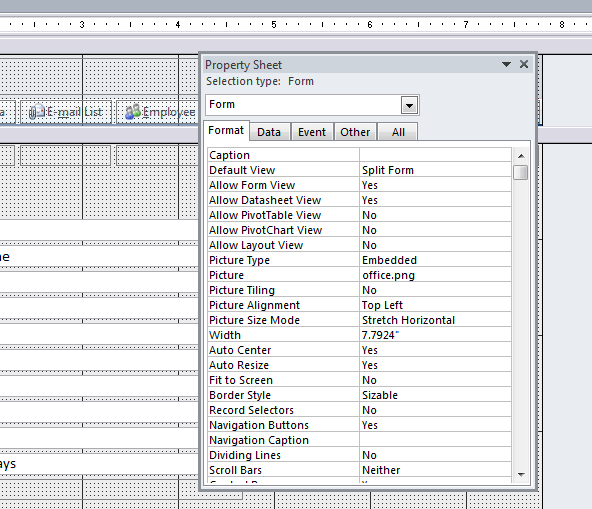
    proj2Ever notice, after downloading and opening up one of the templates available in Access, that the forms have this really snazzy beveled bump at the bottom of the form header? This is where the buttons sit, and it gives the form that little bit extra that say “monkeys didn’t throw this together”. Ever try to figure out where the bloody blue blazes that bump comes from? I did. I spent way too long trying to figure it out. Maybe I’m just slow on the uptake, but I couldn’t figure it out. Until I had a eureka moment.

    Here’s the secret: it’s an image.

    propsheetYup. If you go into the Property Sheet of the form in Design mode, you’ll find that it is actually an image that is set up in just the right way to make it look great. The Picture Size Mode is set to Stretch Horizontal which takes the picture and pulls it to either side of the form like Stretch Armstrong. The Picture Alignment is set to Top Left or Top Right (the left or right doesn’t matter since it’s being stretched–it’s the top that’s the important part)

    Which gives you a really nice way of making the form look good, right?

    Except…wait…how do I get a copy of the image?

    It was like know the secret of how to make fire, without have any tinder to start it. All I needed was the picture, and I would be able to give my form that look the says “A professional did this, not my nine-year-old.” Except I couldn’t. I saw that the file in the Property Sheet was called “office.png”. I scoured the web looking for a similar image and came up with bupkis.

    This is where the forum post came in. (I’ll keep looking around for it and if I find it, I’ll update this post with a link back.) The post suggested using a capture tool of some sort (like the Windows Snipping Tool, or SnagIt) to grab a small part of the screen when the form is running. Save that snip, then use it as the embedded image in the form.

    Oh boy oh boy oh boy oh boy! (I’m easily excited at times.)

    CaptureI did exactly that, grabbing this image to my left. I then set the properties of my new form the same way I found them in the Microsoft template. I worked like a charm.

    Capture3There are some caveats that go with this:

    • If you’re going to capture the image, you’re obviously stuck with whatever color scheme you’re grabbing.
    • Because it’s an image, you’re stuck with whatever height you’re grabbing. A nifty way around that would be to extend the upper part of the image with some type of cloning tool that you can find in Adobe Photoshop. But that’s getting toward a lot of work for a minor visual display.

    That’s it. Have fun with your forms.

  • Book Review: “Going Clear”, by Lawrence Wright

    February 9th, 2015

    GoingClearCoverHaving taken most of December and January off from blogging, it’s time to get back to it. What better way to start than with a book review. And a humdinger of a book it is.

    You may have heard of Lawrence Wright’s investigation into the Church of Scientology. His book “Going Clear” is the result of a long-form journalism article that appeared in the New Yorker that told the story of Paul Haggis’s very public exit from the Church. Paul Haggis, for those who don’t know, is a screenwriter and director, most well-known for writing and directing the movie “Crash”. Additionally, you may have heard of the documentary “Going Clear”, directed by Alex Gibney. It is due to air on HBO on March 16th, after making a big splash at the Sundance Film Festival this past year. The documentary is inspired by Wright’s book.

    The book itself continues to use Paul Haggis as it’s central core around which the rest of the narrative revolves. Haggis’s early experience with the Church open the book, and after a lengthy but necessary detour exploring the life and times of L Ron Hubbard, who founded the Church, and David Miscavige, who took over from Hubbard once Hubbard was no longer well enough to run the Church, the narrative returns to Haggis.

    One of the great difficulties of writing on this topic, prior to Haggis’s departure and afterward, is the lack of information about the inner workings of the Church of Scientology. The Church, which goes out of its way to maintain its secrecy, has ttired to tightly control information about its inner workings. There is, therefore, very little documentation from which can be drawn an investigation. Wright uses, as his sources, many ex-Scientologists, which have given harrowing accounts of what life inside the Church is like; official public documents, such as the Naval records of Hubbard from his time in the service during WWII; leaked scriptural content, which ex-Scientologists have managed to smuggle out of the Church as they made their escape; and the few books and investigative articles that have come before. Interestingly, for this last category, there are very few. The reason is because the Church makes a deliberate effort to undermine these kind of investigations, and, failing that, harass the authors with private investigators, lawsuits, and even framing them for felony crimes.

    profile-LRHBecause limits that the Church will go to in order to protect itself seem to be boundless, this book becomes a page-turner of a story, enumerating the actions the Church has taken over the years against individuals, businesses, and even an enormous government bureaucracy (the IRS). The founder of the Church of Scientology, the prolific science-fiction writer L Ron Hubbard, is presented in a manner that show him to be at best a pathological liar and at worst a paranoid schizophrenic. The current leader, David Miscavige, is portrayed as a tyrant rivaling some recently toppled despots, who is willing to use humiliation, degradation, and even physical violence and abuse to get what he wants.

    In recent years, a number of stories about the inner workings of the Church have come to light. Stories of a place called the Hole, a set of un-air-conditioned trailers sitting in the dessert with bars on the windows and security guards at the door. Stories about how church members have been made to lick toilets clean or subsist off of leftover table scraps or sleep on floors covered with ants. What’s amazing is that these Church members are typically high-ranking members of the Church’s leadership whose only sin was to land on the wrong side of Miscavige’s ire. Additional stories have emerged from former Scientologists themselves, on sites such as exscientologykids.com.

    When taken as the sum of its parts, the book never truly decides what it wants to be, which may its only significant flaw. It is a compelling read, and it’s easy to see why it was a finalist for the Nation Book Award. But there is a lot of stuff going on inside its 450+ pages, all of which relevant, all of which, when woven together tell a helluva yarn, none of which take a specific stand. Perhaps good journalism is like that, letting the reader determine the stand they must take. As such, “Going Clear” is part expose on human rights abuses, part biography of the charismatic and troubled founder, part investigation as to why Hollywood is so fascinated (some would argue “taken in” or “hoodwinked”) by the Church. Many people these days outside of the Church are most familiar with Scientology based on interviews celebrities such as Tom Cruise has given, where his defense of the Church has been oddly aggressive. Wright’s book shows that interior of Scientology is much darker, and it’s perceived weirdness much deeper than what most readers know. If anything, Wright’s book is as concise a history of the Church of Scientology as one is likely to find outside the church’s officially blessed and released histories.

    It is in the epilogue where Wright’s investigation (the Church might in fact describe the investigation as “muckraking”) transcends the the rest of the book. He never offers an indictment of the Church, though, if even half of the stories that ex-members tell are true, then one is certainly warranted. He also never truly defends them. The epilogue is where he comes the closest, holding the Church of Scientology and all of its troubling history and downright bizarre space-opera cosmology up against other profoundly popular and recent theologies. The most obvious is the Church of Jesus Christ of Latter-day Saints, otherwise known as the Mormons, who believe in a third book of the holy scriptures known as the Book of Mormon, a scripture based on an ancient set of holy tablets found right here in the good ol US of A. He compares Scientology, rightly or wrongly, to both cults and ancient religions such as Buddhism and Christianity. The Reverend Jim Jones, another charismatic leader, led hundreds to their death at their own hands in Guyana. Christianity, in its early days, was persecuted by the Romans who must have thought that the idea of a single god was absolutely bonkers. In both cases, as with active Scientologists, their belief is absolute. What any and all faiths rely on is that very word itself: “faith”. There are always going to be aspects of faith that are un-proveable. An atheist demands proof, which he will never get, and the believer believes blindly, never questioning whether that which he believes is maybe just a little bit crazy. In comparing Scientology to other faiths, creeds, and cults, Wright wraps up his book on a high note, reminding us without chastising us that matters of human rights abuses must certainly be addressed. Matters of individuals faith is really no one else’s business.

  • NaNoWriMo – The Lessons Learned

    December 3rd, 2014

    Winner-2014-Twitter-Profile
    Let’s start off with this brief summary of my participation in this year’s NaNoWriMo:

    I WON!

    Yes, that’s right, I won the NaNoWriMo contest this year, where anyone who hits the 50,000 word mark in a brand-new-never-having-written-a-word-of-your-NaNoWriMo-novel inside of thirty days wins. What do we win? The ability to say we won. That’s it. No cash, no prizes, though there are some nifty T-shirts you can buy. So, in short, you win bragging rights.

    Which is saying a lot for a free contest where there are thousands of winners.

    That out of the way, I want to reflect on the lessons I learned from cranking out 50k words in a month’s time.

    1) You are not alone. There are lots of people out there willing to lend encouragement and good thoughts and happy vibes and whatever else they feel like throwing your way for support. There are communities out there supporting writers, there are meet ups where you can all sit down together and write and lend an actual hand for someone to hold if they need it. There are professional writers who have lent their voices in encouragement, and there is no end to the number of people tweeting about NaNoWriMo on a daily basis.

    2) You are absolutely alone. No one can write this thing for you. It’s you by yourself, mano-e-mano, man versus machine versus calendar. It’s a gnarly threeway brawl that you and you alone must fight. Nobody else can jump in. This isn’t the WWE. You can’t tag somebody else in if you feel like you’re fading. You are the only one who can write your book. Otherwise you fail the contest.

    3) You are not alone. Think your special? Just because you did it? Just because you hit your daily word count? Get in line. There are thousands and thousands of people who jumped into NaNoWriMo and have hit their daily word counts. Thousands have hit their word counts sooner, faster, higher than you have. Take that in, realize this, take a big deep breath…then let it go. You can’t get caught up in how far ahead or behind you are in reference to anybody else. To do that invites disaster. If you start doing some sort of comparison project with your fellow writers, you’ll get into a mine-is-bigger-than-yours mentality that is at best a complete waste of time, and at worst mojo-wrecking. If you’ve got your mojo working, who cares if your mojo is better than somebody else’s? Who you trying to impress with that shit?

    4) Write as much as you can as early as you can. Cause you never know when your gonna get an injury that requires you to be carted off the field. My goal was to finish my word count by Thanksgiving (which I did, by the way). I wanted to get it done so that I could enjoy my holiday, maybe spend the day picking at some words but not feel forced to hit a daily number. Besides, the food coma was gonna be epic this year, man, epic.

    You know what I enjoyed most on Thanksgiving? Pedialyte. Thursday morning I got a case of the stomach flu and that was all she (or in my case, he) wrote. For two days my colon sounds like the French countryside in 1944. By Saturday I was finally starting to feel better, but it was slow going. I didn’t have a lot of energy since I hadn’t had a decent calorie in two days. By Sunday I felt well enough to open up the laptop, type in one paragraph, and that was it.

    5) When the month ends, the motivation does too. It’s good to feel the pressure of the deadline. It makes you work for it, forces you to make time for writing. Even if you’re just picking up the story, writing 200 words for the fifteen minutes you have leftover from your lunch break, and closing it again. The deadline manhandles you into writing during any snippets of free time you have.

    When the deadline has passed, the pressure goes with it. Now you’re not up against a wall, trying to squeeze words in, desperate to hit a daily word count. Now you start to think “Well, I couldn’t quite get to it today, I’ll just pick it back up tomorrow.” WRONG! You will not! Stop kidding yourself. If your motivation for writing starts to flag, then so does the writing, then it’s six months after the end of NaNoWriMo and you’re sitting on 55k words instead of 50k. Stop that shit! Open up your laptop and lay down some magic!

    6) The choice of word processors makes all the difference. If you’re using a word processor or a typewriter or a pen and paper, that’s your business. I’m not going to tell you you need to use this one over that one. What I am going to tell you is that, no matter what you use, you’ve got to have it handy at a moment’s notice. You never know when you’ll get five minutes to hammer out two really great sentences. With a pen and paper, that’s a lot easier than just about any other writing medium. You can carry them with you anywhere and be ready to write in five seconds flat. With a typewriter, that kind of thing is a lot harder. You can’t really lug a typewrite around with you everywhere you go. I mean, you CAN, but you’ll get a lot of looks that suggest it might be time for the men in the white coats.

    My choice of word processor was Google drive. Again, this goes back to the available-at-a-moment’s-notice requirement. Google drive is all cloud based, so your fictional manifesto is available anywhere you have an internet connection.

    Using Google Drive, I created the document and was able to access it from any machine I happened to be using at the time. All I needed to do was to log into my Google account and viola! there it was. I could access it from a laptop, or a desktop, or even my phone. How’s that for ubiquitous? It was like having a pen and paper with me at all times. The best part? I didn’t have to type in all the things I had hand-written earlier. Best of both worlds.

    7) Finishing feels like the frickin bomb! Nuf said there.

    That’s what I learned this go-round. Maybe I’ll learn more next year. Already got the idea forming. Just have to let it stew, do some homework, and, oh yeah, finish the current one I still haven’t finished.

  • NaNoWriMo 2014 Update

    November 12th, 2014

    IMG_4281We’re twelve days into NaNoWriMo 2014. How are you doing? Have you cracked under the pressure? Are the words flowing out of you like silver streams of pure literature destined to alter the landscape of fiction as we know it? Are you plowing through your novel, letting the stream of consciousness spill from your mind in an unhinged screed* not fit for human consumption?

    (Hint: The answer to all of these could be “yes”.)

    For my own foray into NaNoWriMo, things are going well. I passed the halfway point last night. I’m no longer underwater in my word count. As of this writing, I’m closing in on 27,000 words. Basic math tells me I have about 23,000 words to go. (Basic math, by the way, is sometimes a stretch for me–I was an English lit major, after all–but I think I’m on solid footing here.)

    Here’s what I’ve uncovered in the twelve days since I’ve started this journey:

    * I’m in LOVE with how much this contest forces me to write. I have a terrible habit of being what Stephen “Uncle Stevie” King call a “lazy writer”. When the writing gets tough, I have a tendency to walk away from it and come back a few months later with no clearer way of tackling the problem. Except that, a few months later, my writing muscles have gone unused and have atrophied and my creative mind has grown fat and lethargic. This contest forces me to confront my writing every day, to flex my penmonkey muscles, and make some actual progress.

    * A single sentence CAN turn into a novel. Like, quick. The novel I’m writing writing now is called Lost Things. It was based on a single (and perhaps rather long-winded) “what-if” sentence I wrote on the back of a church bulletin. The sentence looked kinda like this:

    What if a man helps ferry dead souls to the afterlife by the use of items that show up on his kitchen counter that were personal and special to the deceased, but one day, using one of these “lost things”, he accidentally frees something evil and is then caught in a battle to defeat it?

    Yeah, it’s a run-on, I get it. But it’s turned into something special for me. This one (long) sentence has turned into 27,0000 words in twelve days. This short synopsis helps flesh out that “what-if” sentence:

    For forty-two years Bill has been dealing with the Lost Things. They appear in the morning on his kitchen counter. Each time they do, he takes them to a local secluded glade and, using an ancient rite, he frees the Lost Things’ owners, for each Lost Thing represents a deceased member of the Bill’s town. Each soul needs help transcending the void. After so many years, Bill is tired. He can feel his own time is near and knows he’ll need a replacement, which is why he agrees to teach Geoff. Geoff is a young man, married to his cancer-stricken wife Mara. But there’s a darker force at work in Bill’s town. A force that drives them to free the soul of a maniac and unleash a monster. Bill, Geoff, and Mara must overcome their fears and stop this evil before it can unleash Hell on earth.

    As I plow through the writing, I find the it’s unspooling in my mind, with each day adding a new facet that I can fold into the main story.

    * As this is my first NaNoWriMo, I know that when I go and try doing this again next year, it’s entirely possible that the experience will be the WORST writing experience of my life. I have this thing in my head right now itching to break free. It’s scratching at the inside of my skull with long dirty fingernails, trying to open the cracks. It’s leaking out now, right into my novel, but that’s this year. Next year, I might have the story idea, but it could fight me tooth-and-frickin-nail every day for thirty days.

    * Insomuch as there is a community out there to help encourage you to write, what with all the “pep talks” that appear in your NaNoWriMo mailbox, the NaNoWriMo forums, and the NaNoCoach hashtag on Twitter, this journey, this effort, this mountain I’m (and you’re) trying to climb–yeah, well, news flash, you’re climbing it ALONE. No one can help you with it. If it’s climbing a mountain, then all the encouragement is people lining the sides of the mountain trail cheering you on. But none of them can lend a hand or lower a rope or a tree branch or find something useful to…sorry, drifting in a movie quotes for a moment. The point is, YOU are the one writing. YOU are responsible for all 50,000 words. No one else. And while encouragement helps, YOU have to be the one with the intestinal fortitude to soldier on. This is when you learn whether you really can do it.

    That’s where I am so far. To date, it’s a really great experience. More than halfway there. If you’re not halfway there, no sweat, you have time. We’re not halfway through the month. You got days to make up some lost words. So let’s keep it going. Time to knuckle under, not lose focus, not stray from the marathon course, and keep going.

    I got this.

    So do you.


    * Borrowed this phrase from a friend of mine because I love it.

  • A Grateful Remembrance

    November 11th, 2014

    I’m reposting my entry from last year as a way of remembering the veterans in my family. This Veteran’s Day, take time to thanks the veterans you know, and their families, for both have made sacrifices for our country.

    Scott's avatarScott Lyerly

    I’ve been thinking a lot today about my grandmother who passed away at the end of this past August. She was ninety-four years old. She out-lived her husband, my grandfather, by twenty-seven years.

    The reason I’ve been thinking about her recently is because her loss is still very recent, and I haven’t quite let that settle into my mind or my heart. And because it’s Veterans Day.

    My grandfather was a Marine. He joined the Marines after the bombming of Pearl Harbor. Because I was only thirteen when he died, I didn’t have the chance to ask him about his time in the service.

    So many members of my grandmother’s and grandfather’s families were in the service. My grandfather and his brother were both in WWII. My grandmother’s cousins all had husbands in the service, as was my grandmother’s brother. One cousin lost her husband in the war and went…

    View original post 426 more words

  • Happy International Keyboard Shortcut Day

    November 5th, 2014

    no-mouse-allowedHappy International Keyboard Shortcut Day.

    Never heard of it? Yeah, neither had it. That’s likely because Dick Kusleika over at Daily Dose of Excel made it up. Read more about it here. Basically, the idea is to use only your keyboard as much as possible between the time of 2:30 and 3:30 PM local on this, the first Wednesday in November.

    I’m totally on board. I’m such a keyboard drive guy from my days use an old green-screen inventory management system. This should be pretty much a snap.

    Happy Keyboarding!

  • Some Election Day Thoughts on the Viability of Candidates

    November 4th, 2014

    ivotedDid you vote today? Should you have? If your state was running an election and you voted, good for you. If your state was running an election and you decided not to vote, well, then I guess good for you as well. One of the great things about our country is the fact that you could decide to vote or not to vote. It’s totally up to you. It’s that freedom of choice that we as Americans have that a lot of other countries do not have.

    If, on the other hand, you had the opportunity to vote and simply didn’t because you were too lazy to get off the couch to do so, well then shame on you. You missed a great chance.

    I really enjoy voting. I always feel happy and elated after I finish. I know I’m one small voice in a very large conversation, at least I’m making the effort for that voice to be heard. I’m actually not that heavily into politics. I don’t spend a lot of time reading political blogs, or trolling through online news/media outlets that cater to my political leanings. I do enjoy reading Politifact because of the way they pick apart the issues. They always provide clarification on some of the finer and more complex details of these talking points. I also enjoy FiveThirtyEight, because Nate Silver is so good at what he does. That’s pretty much it.

    That said, I have to confess that I have opinions on what makes a good political leader. (I’m thinking mainly of the Executive branch here.)

    To state my opinion, I’ll use Massachusetts as an example. Today I voted for Governor of Massachusetts. My options were Martha Coakley (D) or Charlie Baker (R). No, I’m not going to tell you how I voted. What I am going to do is talk about each candidate’s background (at a high level) and explain why I’m not sure either of their backgrounds necessarily will lead them to be effective governors.

    Let’s start with Charlie Baker. In the 2012 election, I lost count of how many times I heard somebody say “we need a business leader in the White House.” Let’s bring it down a level and focus on governor, often times the step just below President. Charlie Baker was in fact a business later. He was the CEO of Harvard Pilgrim Health Care, and helped turn it around when it was facing bankruptcy.

    1. Lots of people say that good business leaders would make great political executives. Here are my basic problems with that:
      A company executive doesn’t play by the same rules that a political executive must play by. If the CEO of the company doesn’t like the performance of someone in his company, he can fire that person. Yes, there might be some hoops to jump through when it comes letting someone go, there are Human Resource personnel to consult, but in the end a CEO has enough power to make those kind of personnel decisions. When you were the president, or the governor, you can’t fire people whose performance you don’t like. Sure you can fire your cabinet secretaries or your office staff, but that’s not what we’re talking about here. A political executive needs to get work done. To do that they need to work with their counterparts in the legislature. If the president doesn’t get along with his counterparts in the legislature, he can’t fire them. Both parties have to agree to compromise or, as has been the case recently, agree not to compromise, in which case nothing gets done.
    2. Another point is that company executive can enact policy is without necessarily having a consensus. Again, a business executive isn’t going to operate in a vacuum, and obviously they will consult with other officers and usually other outside entities such HR and Legal to ensure they’re not breaking laws or fail to be in compliance with federal regulations, etc. In politics, however, order to enact political policies, you must have that majority that you don’t need in a company.

    On the flip side, I’ve heard people say that lawyers make the best politicians. After all, we are a law driven the society, and the policies, laws. and procedures that politicians enact are there to provide further governance for the people. Who best to understand the inner workings of how laws are constructed and work than a lawyer? Martha Coakley is a lawyer. Does that mean she is the best qualified candidate? Not necessarily.

    1. Lawyers, in addition to have a clear understanding of how the law works, also need to understand how to lead. Being a lawyer means that you understand and know how to navigate to labyrinthine bureaucracy at is the federal government. Just because you know the way out of the maze, doesn’t mean you know how to lead people there. Sure some lawyers, probably lots of them, have a lot of leadership ability and a lot of charisma. But the practical experience of running an organization, such as a public company, weighs an awful lot in people s minds.

    So who makes the best executive? A governor possibly makes the best executive when jumping from state level to govern our country. That’s why you see so many governors eventually becoming president of United States. But that’s not always the case. We’ve seen deeply ideological governors become deeply ideological presidents. They weren’t necessarily the best or brightest, yet their popular appeal helped get them in.

    No, I’m thinking something else entirely. Someone with a much different experience than lawyers and CEOs. I’m going to go out on a limb here. I’m going to vote for a different kind of person.

    The project manager.

    This may sound weird and almost silly on the face of it, but hear me out. The primary role of a project manager is to take a group of people and lead them in an effort to deliver something to the business. If you want to get more technical, here’s the definition from PRINCE2:

    A Project is a temporary organization that is created for the purpose of delivering one or more business products according to an agreed Business Case.

    It seems to me that a lot of the same characteristics that qualify a person to be a great project manager could also qualify them to be a great public official. Let’s focus on a few.

    1. In any given project there is an end goal in mind. I would argue that these would be the laws, doctrines, policies, and initiatives that presidents put forth as part of their administration. How many times if we heard someone say what they’re going to do in the first hundred days in office? “Oh yeah?” I think. “Do you have a project plan for that? Then how do you know you’re going to achieve it?”
    2. Any project manager work his or her salt is going to lay out the risks and issues associated with getting this job done. When you do this, you get a fuller understanding for where the most pressing problems are or may be, as well as the to monetize (and there for plan for) any problem that occurs. I would hope any political executive who is trying to promote some kind of change would do this.
    3. A project manager is going to be given a budget. And, if they’re any good, they’ll managed to it. If it seems like the project is not going to come in on time or on budget, they may have to go back to a governing body to explain what the delay is. This is basic project management stuff. In this case, the governing body would be the voting citizens of the United States of America.
    4. A project manager is going to assemble a team that is capable of getting the job done. These are subject matter experts, technical advisers, and of course, the do-ers. You can only have so many managers before somebody has to roll up their sleeves and get the job done. If the project manager surrounds himself with the right people, then the project moves forward in a smoother way than if it was their cousin Vinny or their brother-in-law Bubba.
    5. Lastly the project manager has to be able to lay down the law when necessary. Assemble a good team, trust them to do the work, guide them when they need it, provide direction when appropriate, and given them the smack down if it’s not getting done. The understand that they succeed as a team, but if they fail, it’s the project manager who has failed.

    So why not look for candidates who have a strong background in project management? There have to be reasons why this is not a good idea. Let’s hear ’em. Comment away.

  • NaNoWriMo 2014 – Day 2

    November 2nd, 2014

    IMG_4281.JPG

    I promise not post progress every single day. I think will tend to make people bonkers. But here we are at the end of day two of NaNoWriMo, and I’m just curious: how’s it going?

    For myself, I’m just over 6000 words. It’s a nice start, especially since I know that once the work week hits, life returns to its normal state of crazy.

    No matter how far you’ve gotten remember that it’s farther than you were. Keep writing!

  • NaNoWriMo 2014 Commenceth

    November 1st, 2014

    Participant-2014-Web-Banner

    NaNoWriMo started today. For those unfamiliar with this term, it stands for National Novel Writing Month. It started 15 years ago in the San Francisco area with 21 people participating. Last year there were over 400,000 people who participated. Not bad for something that started as a tiny idea.

    So what is NaNoWriMo? It’s a thirty day month in which you are challenged to write one novel. You might think, hey, banging out a novel in thirty days? No sweat. I can read one in five. How hard can it be to write one? Well, marathon man, you can drive 26.2 miles easy-peasy, but can you run it? Okay then.

    Basically, you have one month, the month of November, to write a novel. What constitutes a novel? For the purposes of NaNoWriMo, 50,000 words is a novel. It doesn’t have to be perfect, it’s a given that it’s a first draft. It doesn’t even have to be complete. You might end up writing an Alan Moore length million word gem. As long as you’ve got 50,000 words logged by midnight on November 30th, you win.

    What do you win? The ability to say you came to play and play you did. It’s bragging rights. That’s about it. No cash, no prizes, just the right to say you took up the pen and completed the challenge. That said, there are sponsors who put up prizes, and who knows? You post and validate your 50,000 diamond, maybe you’ll win those. But that’s luck of the draw. The main prize is saying you did it.

    Cost to participate? Exactly zero dollars. Best. Price. Ever.

    Last year I couldn’t participate. I was in the middle of trying to finish the first draft of a crime novel I’ve been writing. This year, despite being in the middle of revising the second draft of said novel, I had an idea and decided to jump in.

    This is my first time participating. I’m determined to finish. Rough calculation means I need to crank out about 1600 words per day. This will take me about an hour to hour and a half each day. That’s the goal. Plus, if I write more on the weekends, I can “bank” some words so I’m not as crushed for word count in the middle of the week.

    I’ve already got a start and have a little over 3000 words written. I’ll be posting updates on this blog, but if you’re participating this year, you can follow me on NaNoWriMo at this link. I’ll be posting excerpts and looking for ideas and feedback as I go. Obviously I won’t have time to edit just yet, but any constructive feedback is helpful. The more the merrier.

    Let’s tackle this beast together! Who’s with me?

    Oh yeah, one more thing: the writing has to be legitimate writing. This doesn’t count:

    IMG_4280.PNG

←Previous Page
1 … 27 28 29 30 31 … 42
Next Page→

Create a website or blog at WordPress.com

Loading Comments...

    • Subscribe Subscribed
      • Scott Lyerly
      • Join 200 other subscribers
      • Already have a WordPress.com account? Log in now.
      • Scott Lyerly
      • Subscribe Subscribed
      • Sign up
      • Log in
      • Report this content
      • View site in Reader
      • Manage subscriptions
      • Collapse this bar