SCOTT LYERLY

  • Home
  • About
    • Contact
    • Bio
    • My Tourette Syndrome Story
  • Books
    • The Last Line
    • Anthologies
  • Other Writing
    • Short Fiction & Essays
    • Blog
  • Upcoming Events
  • Etcetera
    • Newsletter Sign-up
    • Privacy Policy
  • Facebook
  • Instagram
  • Threads
  • TikTok
  • Bluesky
  • Editing My Fiction (or, What I Should Be Doing Instead Of Watching TV)

    February 17th, 2014

    I don’t like editing. Like, really don’t like it.

    20140217-154120.jpg

    Editing to me has always be one of those things I put off and put off and put off (and put off) until I finally run out of excuses. Then I scrounge around under the couch, certain there must be some old, partially eaten, mold-covered excuses I can use until I can get to the store and buy some more.

    I’m a world class procrastinator, and when it comes to things I don’t like, I never fail to put off for decades what I can do today. But that just doesn’t fly when it comes to publishing.

    I’ve written three books. One I’ve edited to the point where I’m now publishing it on Amazon. The other two are in draft mode. The picture you see at the top of this post is the first two pages of the second book I wrote (and finished–given the number of abandoned writing projects on my computer, it feels important to add that the the first drafts were completed). It is still in first draft status and has been for about seven months or so. I’ve red-penned the first twenty-six pages out of two hundred plus pages. I’ve got a ways to go.

    I started editing this second book, “Dirt”, about four weeks ago. It was immediately after I finished the first draft of my third book. I was on a roll and didn’t want the mojo to vanish, didn’t want to slow the momentum [Scott looks around his desk for another tired metaphor and, failing to find one, moves on]. I wanted to continue on and prove to myself that I could conquer the Editing Beast.

    Yeah.

    No.

    The Editing Beast was definitely not a windmill. It broke my lance, killed my horse, and ripped through my armor to tear out my still-beating determination with its fearsome jaws. This sumbitch tore me apart.

    I have done just about everything to avoid editing. There has been food, and running, and reading. There has been TV. Justified is back on (woohoo!) as is The Walking Dead (meh). I have discovered Longmire, the whole first season of which I took in like a python unhinging its jaw to swallow a goat. In short, I’ve done everything I can to avoid “Dirt”. And here’s the secret as to why [leans in to whisper]: I don’t like “Dirt”.

    It’s true. I shake my head in disbelief at my own feelings about my own work, but it’s true. I don’t like it. “Dirt” is the most Stephen King-like thing I’ve ever written, long or short. It just had that sort of vibe to it. And I dig Stephen King. One hundred years from now, when people ask which author is the most remembered author of the twentith century, it will be Stephen King, just like it is Charles Dicken for the nineteenth century. He’s not writing high fiction, some of his stuff is (by his own admission) a “clunker”. But he tells a helluva story. When I was commuting 120 miles roundtrip every day for work (barefoot, through the snow, without a coat) I would listen to King on audiobook. Since his one goal for so long was to scare the crap out of you, he was great to take on long car rides. Guaranteed to keep you awake. King was one of the first adult authors I remember reading as I grew older.

    So it naturally follows that a novel I’ve written with a King-esque feel to it would completely jazz me, right? Wrong. “Dirt” started off as a short story that couldn’t find an ending. The cast of characters grew and grew. Then the primary antagonist introduced himself and I stepped back and asked the book “Really? Is this REALLY where we’re going?” The book nodded emphatically and then dug its heels in as I tried to drag it acros the finish line like a dog going to the vet. It was a rock fight to get this thing done.

    Now I’m staring down the editing barrel and asking myself how much do I really want to tackle it. There is so much work to do. Like, a dump truck’s worth of manure to shovel through to find a lost engagement ring. And I’m asking myself, how badly do I want to work on it. Especially since I have another book, my third, that I really did enjoy writing and that I’m looking forward to editing. I think I started doing some editing on “Dirt” because I knew I’d have to abandon it in March when I get to work on scrubbing the hard-boiled detective book. So if I didn’t get around to doing anything on “Dirt”, well does anybody really care?

    Unfortunately, yes, I do care. I’m not happy with it, but do care quite a bit. I want to see it finished, I want to see it to completion. I want to see it improved and published and enjoyed. So it might be time to stop scouring the house for excuses, putting it off, and get down to some serious work. Which I’ll do.

    I hearby make a solemn vow to stop procastinating over editing “Dirt” and to begin the serious work on getting it into publishable shape.

    Right after I edit the other book.
  • Review: “The Cold Dish” by Craig Johnson, and A&E’s “Longmire”

    February 16th, 2014

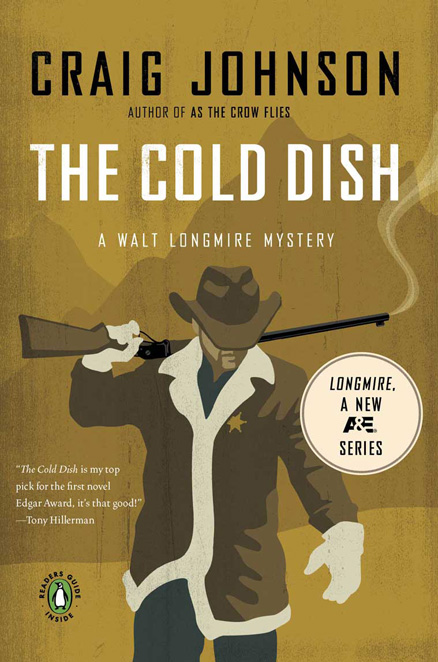
    Today I’m feelin’ generous, so it’s a two-fer. Two reviews in one post. Lucky you! I recently read Craig Johnson’s debut mystery novel “The Cold Dish“, which introduced his character Walter Longmire to readers everywhere. After finishing the book, I powered through the first season of A&E’s original series “Longmire“, which is based on the characters in the Johnson novels.

    cold dish

    Let’s start with the book. “The Cold Dish” introduces us to Sheriff Walt Longmire, Sheriff of Absaroka County in Wymoing. He’s an aging sheriff, looking forward to a retirement that doesn’t appear too far off. He’s a widower, having lost his wife to cancer about four years back, and has, in many ways, lost his zest for life. Longmire is not the first hero of hard-boiled mysteries to be introduced to the reading public as a cynical, drinking, down-on-life-and-maybe-himself character. Nor will he, doubtlessly, be the last. But he has a voice all his own, part of which comes from the proximity to the sweeping landscapes of the American West. Longmire is a man who knows himself, knows his limits, and is cautious about pushing them.

    But push them he does when the situation calls for it. And in “Cold Dish” the situation calls for it quickly. Walt is called to the scene of a crime where the body of a young man is found, shot through the back. The complication here that Walt must deal with is the fact that this deceased young man is one of four that were acquitted of raping a Native American girl with fetal alcohol syndrome a couple years back. It’s a perfect, though perhaps cliched set-up for Walt Longmire to show us what he’s got. Joining him on this venture is a cast of characters that are fairly well-drawn, even if one or two of them ar characitures. There is the female deputy Victoria “Vic” Moretti, a tough-as-nails, unwilling transplant cop from Philly; there is Henry Standing Bear, Walt’s long-time friend and connection to the Native American community on and off the reservation; there is Ruby, the dispatcher and Sheriff’s Office manager who keeps the office moving along while giving Walt stern matronly glares whenever appropriate.

    I found “The Cold Dish” a fun read that kept me reading, which is saying a lot these days. At approximately 400 pages, it’s too long, and suffers from a certain laziness in the editing process. I’m used to the sharp crisp sentences of Robert B Parker, and if you’re looking for those here, you’ll be disappointed. There is also a section that starts off as spiritual and quickly borders on supernatural as Walt fights his way up a mountain through a blizzard. It reminded me of the Halloween episode of [insert cop show name here] where the good guys are plagues at every turn by events that seem other-worldly to them, but turn out to be completely plausiable.

    But not to leave you thinking I didn’t like the book, because I did. The scenery is well-described so you get a strong sense of the Wyoming countryside. In addition, Johnson, a resident of Ucross, Wyoming, (pop. 25)  gives us insight into the relations between Native Americans (who are called and call themselves “Indians”) and the white population living outside of the “Rez”. These are insights that, coming from a different writer, would feel forced, but never once do they feel so with Johnson at the wheel.

    I’m definitely looking forward to the next in the Walt Longmire series. So much so that I decided I had to check out the TV series “Longmire”.

    And how is “Longmire”? So glad you asked.

    20140216-213327.jpg

    As a cop show, it’s average. The plots are standard murder plots, with the usual number of twists and somersaults built in in order to keep you guessing until the end. One of these days, somebody is going to come up with a cop show where you know whodunit, and you (and the detectives) spend the rest of the episode trying to get enough evidence to convict. That’s not this show. There is also, not unlike a lot of shows these days, and over-arching plot that slowly threads its way through each episode and ties itself together in the season finale. The season ends on a sort-of cliffhanger. There’s clearly a lot more story to develop with the characters, but you’re not left wondering who shot JR.

    But this is no different than any other cop show these days, which leaves the question, why watch it? The answer: Robert Taylor. Taylor is an Aussie actor who American audiences will only recognize as Agent Jones from “The Matrix”.

    untitledrobert-taylor-longmire-4

    This role couldn’t be farther from that, and Taylor makes the character of Walt his own. His widowership is only a year (whereas in teh books it’s four years) which makes the pain much closer. He’s aided by Katee Sackhoff in the role of Vic, and she too makes the role her own. Described in the books as a handsome not pretty, square-jawed woman, Sackhoff’s features seem cut to order for the role. Add to that her ability to play hard-nosed, characters (see “Battlestar Galactica” for reference) and she is perfect in the role. Rounding out the cast is Lou Diamond Phillips in the role of Henry Standing Bear. Phillips is not the first person who comes to mind when you think of a bar-owning native American friend of Walt, especially since they are approximately the same age. The first person I thought of for the role was Wes Studi, an excellent Native American actor (see “Last of the Mohicans” for some amazing work). But Phillips, like Taylor and Sackhoff inhabits the role and you never once question whether he belongs there.

    I really enjoyed the first season of “Longmire”, for as run-of-the-mill as the murder plots are, the characters are fun to watch and the scenery, well, it can’t be beat.

    So there you have it. “The Cold Dish” by Craig Johnson, and “Longmire” the show inspired by Johnson’s characters. I’d recommend both.

  • Excel Geeking: Counting Instances Of Find/Replace With VBA

    February 14th, 2014

    A coworker gets a workbook full of data that he needs for generating metrics every week. The problem is that this workbook is loaded with textual errors. There are leading and trailing spaces all over the place, there are misspellings of all sorts, there are multiple entries that all mean the same thing. He might see one record for “Business Analyst”, and another for “BA”. He might also see an entry for “Busniess Analyst”. The data in this workbook is clearly manually entered, and because my coworker doesn’t own it, he can’t control the cleanup of the data. He has to cleanse it every week in order to extract the metrics he needs.

    This week he finally had had enough and asked my help developing a couple of routines to clean up this spreadsheet. The first was to trim all the extra spaces from the data. Easy-peasy. The next was part was to develop a method to find/replace a number of entries, which meant setting up a sort of batch-like utility where he could load up the things he wanted fixed and run them with the touch of a button. This was pretty straightforward, except I, of course, couldn’t stop at just a quick little utility. No. I had to build my own thing that could be used by anyone and had all the normal functionality in the native Find/Replace, except that it would run in a batch-like mode.

    I’ll post more about this utility in another few posts, but today’s post was emulating the messaging that Find/Replace gives you when you use the native function. Specifically, I wanted to give the user a total count of the changes made after running the “batch”.

    Here’s where I had to put on the ol’ thinking cap. When you use the Find/Replace function in Excel, you get a response that looks something like this:

    find replace count

    Okay, great. Exactly what I want to present. However, when you use the Range.Replace method in VBA, you don’t get a count of items replaced as the return for the method. The Range.Replace method returns a boolean. How frickin annoying is that?

    So I started thinking what was the best way to capture the total number of items changed? The first one that springs to mind is the good old For/Next loop. Set a range variable, loop through all the cells in that range, check ’em out to see if their contents match your “find” string (which you have doubtlessly captured as part of an input box or something similar), and if the contents match, change them with the “replace” string and increment a counter variable.

    Sure. That would work. But I don’t like to iterate through ranges if I don’t have to. Doing so in VBA tends to take a lot of processing time, especially the bigger your range. I really wanted to use the Range.Replace method if I could because it was designed to take on large chunks of ranges in a single statement.

    So, how to do it?

    I decided on another function that’s designed to take on large ranges in a single statement: COUNTIF. Using Application.WorksheetFunctions.CountIf, I was able to use the range I’m acting upon as the first parameter, and the “find” string as the second. Bracket the “find” string with a couple wildcard “*”s and pass the COUNTIF result to a long variable, and suddenly I had captured the number of changes I’d be making and actually making the changes, all in two lines of code.

    Now, the code looks something like this:

    Const sWILDCARD As String = "*"
    
    Dim sFind As String
    Dim rReplace As Range
    Dim lCount As Long
    
    sFind = Application.InputBox("Enter the string to be found:")
    
    Set rReplace = Selection
    
    lCount = Application.WorksheetFunction.CountIf(Rng, sWILDCARD & sFind & sWILDCARD)
    
    '...more code here as needed
    

    Two lines of code. It’s a beautiful thing.

    More to come on this one as it continues development…

  • How To Spend A Snow Day

    February 11th, 2014

    We’ve got another one on the way. Another winter storm that they’re saying could be a “major” storm. Fun fun. What will we do if we have another day where schools, businesses, towns, governments, and Dunkin Donuts are all closed? (Okay, let’s be honest for a moment: I live in New England. Dunkin Donuts is NEVER closed.)

    In all likelihood we’ll do what we did last Wednesday. Last Wednesday we ended up with (you guessed it) another snow day, stuck inside a small house with each of every one of us eventually going a little bit stir-crazy. (I don’t mean to sound bitter about all the snow, I did voluntarily move north fifteen years ago after all. But c’mon, enough’s enough.)

    So what did we do to pass the time last Wedneaday?

    We cleaned.

    (Doesn’t everyone do that on a snow day?)

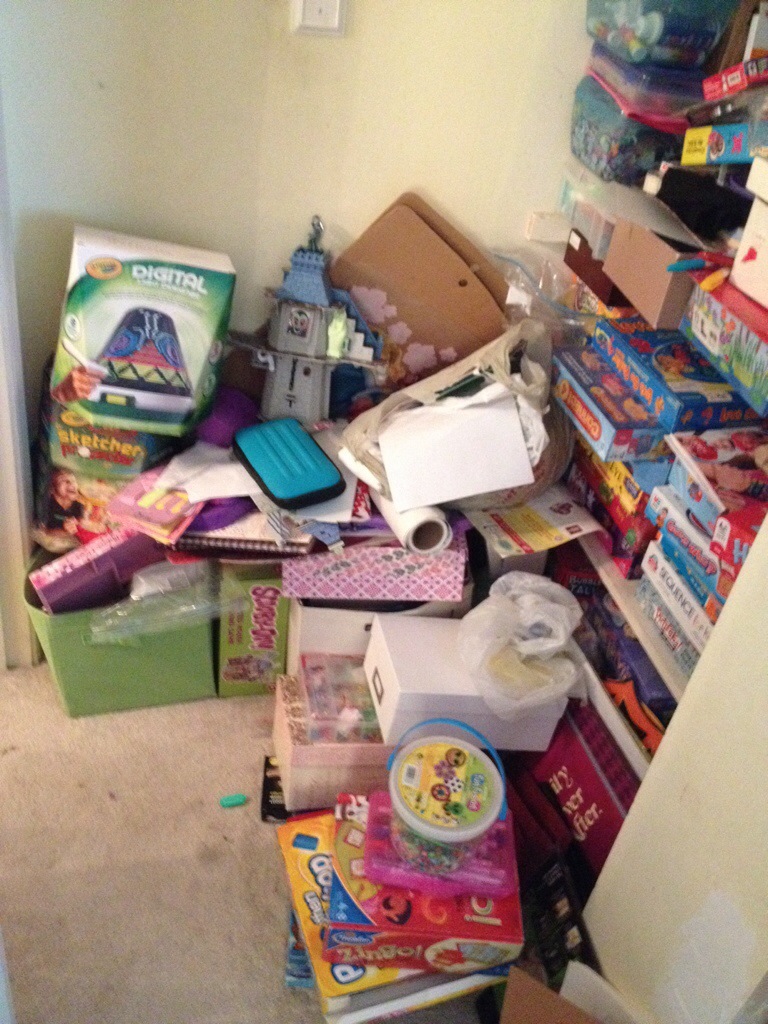
    We’re still digging out from under all of the Christmas and birthday boxes and paper and crap that’s exploded all over the place. It felt good to really dig into some dark corners, tear it all apart, and put it back together again in a neat and orderly fashion. Not to mention the throwing out of a ton of shit that we just don’t need or use. I think we ended up with five big black trash bags worth of stuff we junked.

    But the pièce de résistance belongs to my wife, who took our arts & crafts closet for the kids from this:

    20140211-200638.jpg

    To this:

    20140211-200944.jpg

    It’s a thing of beauty.

    PS – I could hear my wife even as I wrote this, in my head, going “My god, don’t show them what it looked like!” Yeah, it was a mess. But if you’ve been in my house, you’ve already seen it. The fact is, this is life, life with two kids in a small house, and you know what? It’s messy. That’s something I try to make myself at peace with every day. It’s not easy, and I fail at the “make peace” part about 50% of the time. But that’s life. It’s not all sitcom. And the fact is, getting this beast cleaned up was a HUGE victory in the house, a victory belonging to my wife. So, I post it.

  • Excel Geeking: How I (Now) Name Range Variables

    February 10th, 2014

    This one is gonna ramble a bit since there is (in my head) a lot of exposition to get through. It will probably also be a relatively useless one to Excel programmers, since everybody has their own preferences for variable naming conventions. But it’s my blog so I get to write about what I want to write about. So there.

    Plus, I’ve been programming Excel for about seven years and this one just occurred to me within the last month. I never claimed to be quick.

    When naming variables, I tend to follow what you might call “Hungarian Notation Lite”. You can read all about Hungarian Notation at the all-important-and-doubtlessly-true-because-it’s-on-the-internet cache of information known as Wikipedia. If you have read the most excellent book by Bullen, Bovey, and Green called Professional Excel Development, you’ll find their examples all use Hungarian Notation. They even have a section in one of the early chapters dedicated to proper naming conventions for all aspects of your Excel programming.

    The type of Hungarian Notation that they use is what the Wikipedia article refers to as “system” notation, where the prefix of the variable name is represents the physical data type of the variable. What does that mean? It means that if you have a string variable called Message, then the actual variable name is prefaced with nomenclature that represents the fact that Message is a string variable. In this case, Message becomes strMessage, with the “str” representing the fact that Message is a string variable. Why use this kind of naming convention? Because when you’re reading through code you can quickly determine the Message is a string variable without having to stop and go back to the declarations to make sure you’re remembering it properly.

    I use this method, but I use what I consider to be a “lite” version of it. If I have a string variable, I don’t type “str” in front of the variable, I just type “s”. In my world, strMessage becomes sMessage. Why do I do this? Part of it is laziness I suppose, I find it a pain to type three letters when I find one will do. Another reason is that I find it more readable. For some reason my eyes can take in an “s” and translate that to “string” better than “str”. My eyes stumble over “str” (or “lng” or “bool” or “rng”, etc.) and slows up the rest of my reading of the code. Cause, you know, I’ve curled up with a good multi-page printout of VBA code before and read it to relax. (Haven’t you?)

    Okay, so to get down to the purpose of why I started this long-winded blog post, it’s about the range variables. Which I start with “r” instead of “rng”. (Get over it.)

    I, like a ton of other Excel programmers, iterate through ranges in my code on a fairly regular basis. If you do anything that’s table-driven, odds are you’re using a For/Next loop to cycle through the ranges and find the values you’re looking for. To do this, I use the Range collection. How that works is that you set a specific range variable to something, then use another range variable to cycle through the first one. It looks something like this:

    Dim rng As Range
    Dim rCell As Range

    Set rng = Worksheet("Some Worksheet").Range("Some Range")

    For Each rCell in rng
    Do something here...
    Next rCell

    Essentially what I’ve done is set up a whole range of cells to be the first variable. This creates all these cells as a collection housed within that variable. Then I can use the second variable to loop through the whole collection and evaluate each member of that collection. I look at the first cell, see if it meets whatever criteria I have to take further action, then move on to the next cell using the Next rCell line.

    Here’s where I’ve been slow.

    I’ve always used the following to name my variables:

    Dim rng As Range
    Dim rCell As Range

    For Each rCell in rng
    Do something here...
    Next rCell

    Where it gets muddy is when you have to iterate through multiple ranges in nested For/Next loops. It ends up looking something like this:

    Dim rng1 As Range
    Dim rCell1 As Range
    Dim rng2 As Range
    Dim rCell2 As Range

    For Each rCell1 in rng1
    For Each rCell2 in rng2
    Do something here...
    Next rCell2
    Next rCell1

    Yeah. No. That’s flippin ugly.

    Yet this is how I did this until about a month ago when it dawned on me: why not name my range variables in the same way other collection are named? For example, to iterate through all the worksheets in a workbook you would use something that looks like:

    For Each Worksheet in Workbook.Worksheets.

    Brilliant Holmes! Now, if I’m looping through a range, my variables will look something like this:

    Dim rSettings As Range
    Dim rSetting As Range

    For Each rSetting in rSettings

    Much cleaner, much easier to read, and you can quickly determine which set of ranges belong to each other.

    Only took me seven years to figure it out. Like I said, I’m kinda slow sometimes.

  • Food Review: The “Nut Brick” (aka “The Life-Changing Loaf Of Bread”)

    February 4th, 2014

    I was browsing Yahoo one day and came across this recipe.

    I followed the link to the blog from which the recipe came. You can find that here. Turns out that the recipe was put together by Sarah Britton over at My New Roots, a blog she started to share her “edible inspirations”.

    “Life-Changing Loaf of Bread”? That’s a pretty bold statement. I mean, it’s bread, and I loooovvvveee bread, so it’s possible that a loaf could very well be that good. But still, to make that claim, you have to be pretty darn confident. What else could I do but try this recipe out?

    Here’s the finished product with some butter on top.

    20140131-224324.jpg

    First,some notes on the process. I chose to make this recipe with honey instead of maple syrup. I love sugar of all kinds, arguably too much, but if I have to choose between honey versus maple syrup in a recipe, honey wins every time. Secondly, instead of using hazelnuts, which I loathe, I decided to use almonds. But hey, that’s what this recipe is all about. It’s all about being able to substitute things when the original is unavailable or simply doesn’t appeal to you. Lastly, the recipe calls for being baked in a flexible fiberglass loaf pan. I don’t have one of those, and I wasn’t willing to buy it for this recipe, especially considering how much all the ingredients cost. The reason for the flexible loaf pan is because you have to take the loaf out of the pan a third of the way through the baking and finish baking right on the over rack. What I did was line my glass loaf pan with foil, which allowed me to lift the loaf out during baking, peel away the foil, and finish baking on the oven rack.

    Okay, baking done. So how did it taste? Was it life changing?

    Let me say at the outset that, given the recent Yelp lawsuit decision, this is my opinion only. It probably doesn’t hurt either that I’m not accusing Sarah Britton of billing me for work she didn’t do and stealing any jewelry. But, to reiterate, my opinion here.

    Okay, so, was it life-changing? For me, I’d have to say no, it wasn’t.

    I found the bread dense, something that Sarah Britton says she really loves, and which reminds her of bread she had in Denmark. Okay, fine, I don’t mind dense. But this was Dense with a capital D. So dense that it could not be eaten alone, it had to be consumed with a beverage of some kind. I choose coffee since I was eating it in the morning. The bread turned out to be pretty short since my loaf pan is wide, probably wider than what is used in the original recipe. This made it too short for sandwiches. It was also far too dense to be a sandwich bread, and I’m not sure it would hold up if you layered all of the usual sandwich toppings on it. It was so dense my wife, upon trying it, labeled it the “nut brick”.

    As for the taste, well, it tasted like nuts. If you’ve read through the recipe, you’ll see that it is a very nut/seed driven recipe. The oats helped keep it from becoming too much like a baked jar peanut butter, but the taste was very nutty. The aftertaste was all sunflower. Were I to make this recipe again, I’d probably halve the amount of sunflowers and up the amount of oats.

    And maybe that’s the point. Maybe the point is to take this as a starting point and playing with the amounts until you get something that appeals to you. With a recipe that lends itself so easily to adjustments, maybe the end game is to experiment until you find the right combination to make it a bread you’ll ultimately enjoy and want to make again.

    Which leads to the final thought: will I make it again? Probably. I have all these frickin’ ingredients (see below). I have to do something with them.

    20140204-212932.jpg

  • The Maffetone Method – 4 Months In

    February 3rd, 2014

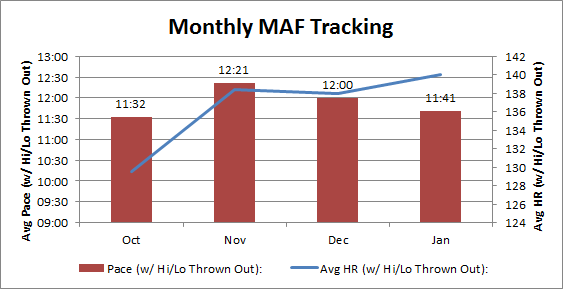
    Finished up month four of my Maffetone Method training experiment.  Let’s start with the artwork:

    maffetone_avg_month4

    running month 4

    Overall, between December and January, I dropped another 19 seconds on my average pace. Obviously I’m thrilled with this, but I’m also cautiously optimistic about whether that will continue. January saw me run my very first race. I did well, setting an unofficial average pace of 9:22. I say unofficial because this is based on my own time, based on the GPS on MapMyRun. The potential for racing is one of the reasons I decided that, for data purposes, I’d throw out the highest and lowest pace. The reason I’m cautiously optimistic is because when I take the 9:22 pace out of the equation, my adjusted average pace remains at 11:41.

    In January I managed one more run than I did in December, logging nine runs instead of eight. I would have logged a few more, but I live in the Northeast and if you’ve seen any news you know that we, along with the Midwest, have been freezing our butts off (thank you, polar vortex). We’ve also had quite a bit of snow (another 10-incher is forecasted for Wednesday). I have been running when I can, but sometimes you just get sick of running in the dark and the cold and when the alarm goes off at quarter to five in the morning, you think “bullshit”, flip the pillow to the cold side, and go back to sleep. But even though it was only one more run than December, I managed to log seven more miles than I had in December.

    The primary reason for the increased mileage is that I’ve been making a point of running for five miles each run instead of either three or five. I stopped giving myself “three” as an option. I wasn’t able to get five miles in every single run, but I was able to get it for the majority of runs, which is why the average mile per run is 4.8 for January instead of 4.5 like it was for December. It’s a small difference, but I find it helps. Mileage is one of the biggest challenges for any runner using Maffetone as a training program. Phil Maffetone outlines what your heart rate should be and how to test your heart rate over time to see how the pace decreases as your heart rate remains constant. But he doesn’t provide a mileage program. He says it’s too individualized, runner by runner, to be able to provide a mileage program. This drives me bonkers. How am I supposed to know when I should up my mileage versus take it short and easy?

    In the end, it’s been all about the “feel” of it. When I run five miles, it takes me under an hour. I usually clock in between 56 and 57 minutes. So let’s round up. In an hour I can go, Maffetone slow, five miles. This past weekend I finally got a good long run in, the first of the winter. I just sort of rambled around the roads of my town and ended up running miles in an hour and a half. I also had a really great Maffetone-slow pace, checking in at 11:23 per mile with an average heart rate of 142. Took me an hour and a half. So while I’m still focused on completing a certain number of miles, I’m boxing the miles in using time. It’s a bastardization of Maffetone’s schedule, but it’s working so far.

    So that’s the summary of month four. Planning to get out on the road as often as I can, provided the weather cooperates. If I keep a regular schedule and Old Man Winter shoves off, I should be able to run three times a week. In a month, that’s twelve runs. That’s my goal for February.

    See you in thirty (well, it’s February, so twenty-eight) days.

  • Word Processing Mobile Apps: A Review Of Three Of Them

    January 31st, 2014

    So here’s where I admit I’m probably a little nuts. Because I am. For a lot of good (and perhaps a few not so good) reasons. But the reason I’m focusing on at moment is how I wrote the first draft of the book I just finished.

    You see, I wrote a good 75% of it on my phone.

    I have tired thumbs.

    The thing about phones these days is that they’re handheld computers. My iPhone is a web browsing, word processing, relationship maintaining, gaming console. It’s everything you might find in a 1990 Radio Shack ad. Like, everything. In a 3×5 sliver of glass and metal.

    Because phones are obviously so portable and these days so powerful, I was able to fill any little nook and cranny of spare time I had using my phone as my pen. Waiting in a long line? Write some. Stuck in the passenger seat on a long car ride? Write some. In a darkened room waiting for a child to fall asleep? Write some.

    Seriously, with a phone and a word processing app, you can literally write anywhere, anytime.

    With that said, I tried three different writing apps for iPhone. Bearing in mind I haven’t tested every single function each had to offer, and may be therefore missing something cool, here’s my rundown of each:

    • Evernote – This was the first app I used, back when I had a Droid phone. It’s gone through a number of updates since then. It has a clean interface and pretty seamless web component. You can also down the add-in part for programs like Microsoft Office and Internet Explorer, and the add-in helps you clip things you like or feel you need to keep for later. My primary problem with Evernote is that the “notes” are captured and displayed in HTML (hypertext markup language, the primary language of displaying content on the web). This makes it difficult to edit your work due to the fact that the formatting is guided by what your browser needs to see, rather how you would like to see it. At its heart, it’s a note-capturing, web-clipping program, and not a word processing app.
    • Quip – I hadn’t heard about this one until late last year. I downloaded it and tried it and it was nice, fairly streamlined, clean user interface. That’s for the mobile app. Like Evernote (and Google Drive, coming up below), you can access your work online. That when this one lost me.I found the online UI was clunky and hard to work with. Try to edit a paragraph and you are essentially clicking into a text box version of your paragraph to edit. The online version has a nice feature that tracks what you’ve edited and keeps it off to the side. But like Evernote, it approaches the text as content to be formatted for HTML. Because of the lack of word processing capabilities (first paragraph indentation, for example) and because I was looking for a seamless transition between phone and browser, this app left me wanting.
    • Google Drive – Does anybody know anybody who uses Google Drive (formerly Google Docs)? Actually, I do know a few. I’ve done some work for a company who used to keep their P&L on a Google spreadsheet. Is it Excel? No, not even close. Is passable for what you need? Sure, if you need basic spreadsheet stuff. Same holds true for the word processor. Is it going to replace Microsoft Word? Not a chance. Is it a good alternative if you want to keep your stuff in the cloud? You betcha. I just wanted to find something that would work like a word processor online. This ended up being the one. Does it have it’s drawbacks? Of course. Fully opening a long document for edit takes a long time as Google Drive retrieves all of that information. Full word processing capabilities are available on the web only and not in the mobile app. But is this the one I ultimately chose to write my book in? Sure was. And it’s ready availability helped me keep my book on the front burner and finish it.

    This is just my experience with mobile word processors with a companion web component. Google Drive seems to me to be the one to beat. My two cents. Probably worth half a penny, but there you are.

  • Happy Birthday, Gram: A Story Of My Grandmother

    January 30th, 2014
    My grandmother belly-laughing at something my daughter did when she was a toddler
    My grandmother belly-laughing at something my daughter did as a toddler

    This is a little bit of a love letter. Today would have been my grandmother’s 95th birthday. She passed away at the end of last August. In honor of her memory, I thought I’d share a family anecdote I didn’t know before she passed. I learned about this one in the weeks after her passing, as all the stories, memories, and tall tales started to emerge.

    This one is about the first house she bought. And what’s important to note here is that she bought it. My grandfather had joined the marines and was serving in a tiny little corner of hell called the Pacific. My grandmother, on her own, decided that the time was right for her to buy a house and settle into it. I don’t know the exact reasons why, so I’d have to speculate, but I would guess it was so that my grandfather would have a house to call “home” when he was finally able to come home.

    My grandmother found the house she wanted and went into the bank. She was working for the now defunct Bonwit Teller department store. She need to work to make up the balance of the budget, since the pay for a marine serving overseas wasn’t terribly large.

    She arranged the financing and settled the mortgage. Knowing her the way I did, she did this without fanfare or panache; it was simply the right thing to do. Not that she wasn’t full of doubt. Buying a house is a big deal, a lot of money, and no matter how full of confidence you are, there’s always a certain specter of doubt that lingers. Maybe not long, maybe it’s smaller or larger, depending on your personality. But it’s there.

    Or at least it was for my grandmother. She had her doubts. After all, she was a woman buying a house in the 1940’s, not exactly the most liberated time for women, and with the shadow of government telegrams always edging around the door—well, of course there were doubts.

    However, doubts or not, my grandmother was deeply spiritual. She was a lifelong Catholic, and had a particular fondness for St. Therese of Lisieux. St. Therese is known as the “Little Flower”, and is have reported to have said upon her deathbed “After my death, I will let fall a shower of roses…”, meaning she would send a little bit of heaven to earth. Since she loved roses so much, that was a little bit of heaven to her. My grandmother took strength from the story of St. Therese.

    My grandmother settled on the financing with the bank and prepared to go straight to the house. On her way out of the bank, as a thank you for being a customer, someone was handing out roses. Given my grandmother’s spirituality and attachment to St. Therese, she must have seen this rose as a good sign. A coincidence perhaps, but a good sign nevertheless.

    This purchase took place in the winter, not a typical time for blooming flowers in New York. But upon showing up at the house, directly from the bank, there in the garden was a rose bush. And despite the fact that it was winter, on the rose bush bloomed a single red rose.

    It was then that all of her doubts receded. When my grandfather returned from the war, together they started a family, and it was in that house that my mother and my uncle were raised.

    Happy Birthday, Gram. I hope there are roses wherever you are.

    Love, Scott

    My grandmother at the wedding reception of my cousin
    My grandmother at the wedding reception of my cousin
  • What I Didn’t Do This Weekend

    January 27th, 2014

    This weekend was a busy one:

    • There was more birthday celebration for another family member.
    • There were the cupcakes my elder daughter insisted had to be baked as part of the celebration, and the extra time involved in supervising her, as she wanted to bake them herself.
    • There was a mid-year music lesson concert for the kids, who are taking five instruments between them, and so had five separate, albeit short, performances.
    • There was the annual meeting of the church, for which I helped with the preparation of the lunch food that was served.
    • There was the usual running around to grocery stores, Target, and the like.
    • There was a nice five mile run in a -2 degree windchill. Okay, maybe describing that as “nice” is a bit of a stretch. But I was needed and I enjoyed it.

    So, quite a lot.

    You know what I didn’t do this weekend? I didn’t write.

    This may sound strange coming from a writer and self-publishing author, but I didn’t write, didn’t want to, and don’t have any regrets about it.

    I finished a first draft of a novel on Friday, after making sure that I was consistently writing for five straight months. And I loved finishing and love the fact that in another five or six weeks I’ll get to go back and tackle it like it’s brand new to me. I love the fact that my head is already moving on to finishing done other editing projects I’ve got in various states. I love the fact that I’ve already got the idea for the next novel in this detective series, and that I’m starting to plot the outline.

    But as much as I love it, I also need the break. Stephen King once answered in an interview the question of how often he writes by saying he writes every day but Christmas and his birthday. He gave this answer because it sounded good to him, and because it sounded less crazy that the real answer which was, at the time, every day. That’s great for him. He’s Stephen King after all. But I need the break.

    Writing is like anything else, at least for me. I love it, but even though I do love, and often need to do it, like a type of compulsion, I need a break from it, a mini-vacation if you will. I love pizza too, but if I had it every day, I’d eventually hate it.

    So here’s to a little time off. I figure in about a week, I’ll be going stir crazy and will dive head first into another project. In the meantime, I think I’ll read a little and catch up on some TV.

←Previous Page
1 … 32 33 34 35 36 … 41
Next Page→

Create a website or blog at WordPress.com


Loading Comments...
 

    • Subscribe Subscribed
      • Scott Lyerly
      • Join 200 other subscribers
      • Already have a WordPress.com account? Log in now.
      • Scott Lyerly
      • Subscribe Subscribed
      • Sign up
      • Log in
      • Report this content
      • View site in Reader
      • Manage subscriptions
      • Collapse this bar