SCOTT LYERLY

  • Home
  • About
    • Contact
    • Bio
    • My Tourette Syndrome Story
  • Books
    • The Last Line
    • Anthologies
  • Other Writing
    • Short Fiction & Essays
    • Blog
  • Upcoming Events
  • Etcetera
    • Newsletter Sign-up
    • Privacy Policy
  • Facebook
  • Instagram
  • Threads
  • TikTok
  • Bluesky
  • How I Spent My Summer Vacation

    August 17th, 2015

    Ahhhhhh, vacation. Nothing else like it. Especially when all you have to do is get up, roll out of bed, and roll yourself onto the beach.

    Every year, for about a week in the summer, we go up to Wells Beach, Maine. It is one of our favorite places to go, ever. The sun, the sand, the fried food, the ocean breeze…

    Yeah. It was awesome.

    You want the proof? See below.

    Once you get to Wells, you have to drive a mile down, what else, Mile Rd, in order to get to the hotel. It’s a beautiful view of marshlands on either side of the road that fill to the brim with water during high tide, and empty down to sand and mud during low tide.

    IMG_8212

    The view from the balcony at the resort where we stay is nothing but ocean and clouds and sun.
    IMG_8165

    After dinner that first night, we went to the end of the spit of land that Well Beach is a part of. There’s a harbor at the end where, on the harbor-side, I taught my girls how to skid stone.
    IMG_8178

    When the sun comes up in the morning, it’s hard not to feel the sheer raw beauty of nature all the way through your bones.
    IMG_8205

    My younger daughter and I went for a walk that morning. She perched on one of the quarter-slot viewer to get a better view of the beach, waves, and sunrise.

    IMG_8203

    Breakfast that morning was a healthy dose of sugar, courtesy of Congdon’s Doughnuts. What’s funny is that we realized two days later that the word “doughnuts” was spelled wrong on the box, and it took an eleven year old to point it out to us.
    IMG_8220

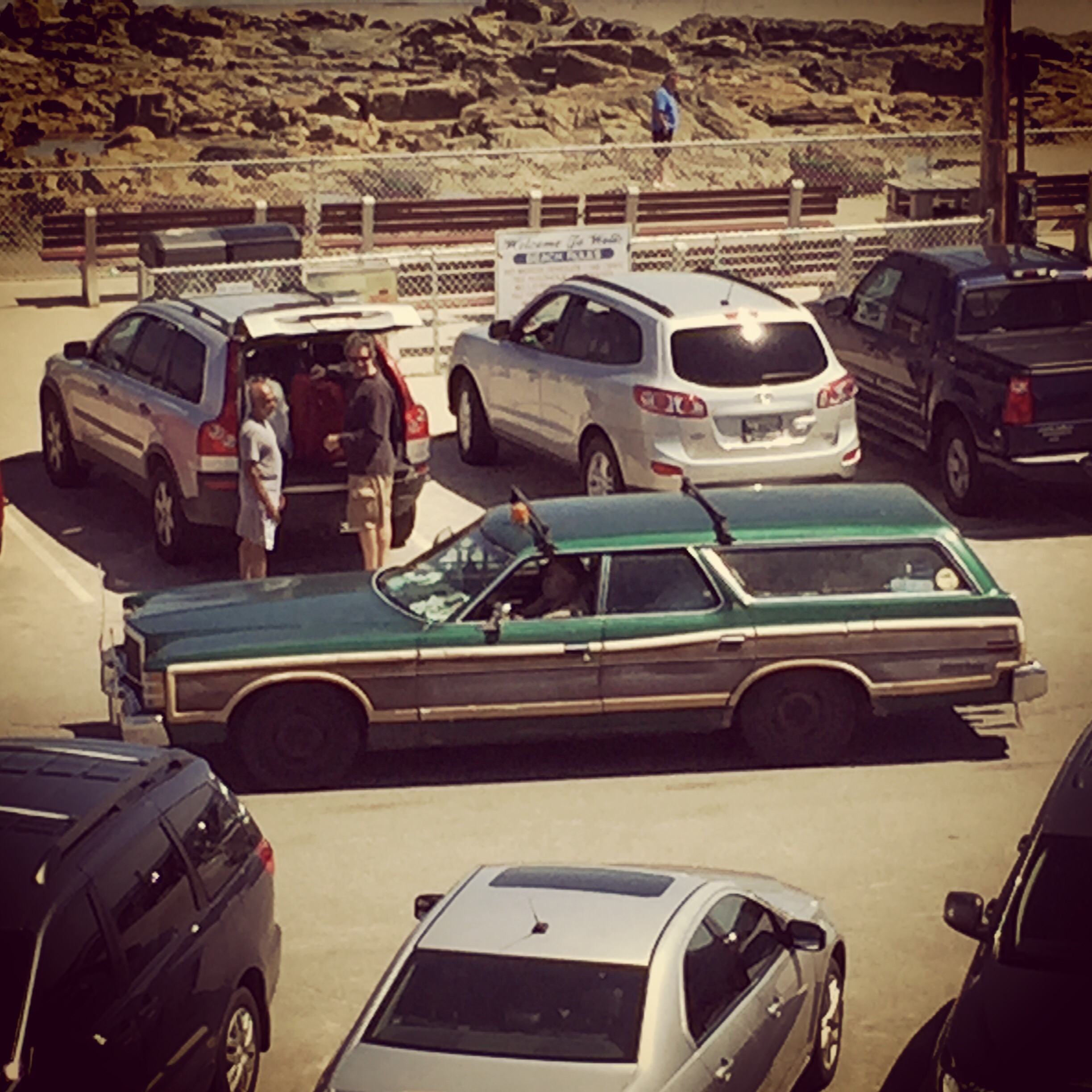
    At a beach, you never know what kind of cars you’ll see. On this trip, we saw what could be described as the Griswold’s Family Truckster…
    IMG_8110

    …as well as a car straight out of a ZZ Top video.

    IMG_8250

    Because half of the fun of a vacation is eating all the food you normally wouldn’t, we hit Mike’s Clam Shack for dinner. My younger daughter ordered her first lobster. I’ve always found lobster to be overrated, but she loved it.
    IMG_8252

    And because what dinner isn’t complete without dessert, it was time for ice cream at the Scoop Deck.
    IMG_8268

    At night, as the parking lot emptied out, you’re left with a feeling of satisfaction, simply watching the evening crowd mosey up to the windows at Forbes for ice cream or frapps, as the sun sets and the sodium lights come on.

    IMG_8274

    The next day was forecasted to rain, and rain it did. But before the rain started, we went for another walk on the beach. The fog coming in from the ocean drifted slowly and swallowed whatever it touched.
    IMG_8486

    The breeze was chilly without the sun to warm you, and so we ambled along the beach in new sweatshirts.
    IMG_8295

    We stumbled across a sandcastle that had survived the evening high tide.
    IMG_8302

    The sky that morning was simply amazing.
    IMG_8355

    That day saw us spend a lot of time indoors. Summer reading was caught up, some TV was watched, but later in the afternoon, during a break in the rain, we went to the beach again to stretch our legs. It was there that we found a large group of rather bored seagulls, who began to take a great interest in my daughter.

    IMG_8336

    Every year when we go, the trip doesn’t feel complete unless we go see “the lighthouse”. And so, on Wednesday, we drove down to York and out to the point where you can walk to the edge of the rocks and see the Nubble Lighthouse.

    IMG_8372

    It’s not a beach, so you typically don’t think about swimming when you’re visiting the lighthouse, but that’s not to say that you can’t go in the water. That point was proven to us as a set of three scuba divers emerged from the deep.
    IMG_8381

    While we were sitting there, enjoying the view, we watched as a fog bank rolled its way toward us. It would eventually devour the large house in this picture, completely obscuring it from view.
    IMG_8369

    Walking around downtown York is fun, especially if you have money to burn. There is always Goldenrod’s which is famous for its candy, especially the salt water taffy. It’s also almost always a zoo to get in and out of.
    IMG_8399

    There’s palm readings, if you’re so inclined.
    IMG_8398

    And there’s a popcorn place that specializes in unique flavors of popcorn. This was one of our selections, and damned if it didn’t taste like buffalo wings.
    IMG_8556

    The following day, we made a return trip to the Scoop Deck with our friends, who were headed home that day. The ice cream was still fantastic. Perhaps, just as fun, are the signed they have in the and around the shop. For example, they have (somehow) the old Wells Beach sign that used to sit out on US1.

    IMG_8499

    Then there are the rules for the ice cream shop…
    IMG_8497

    …and the extras if you’re carrying a little something extra.
    IMG_8500

    The afternoon brought us back to the beach, with the mile high sky above.
    IMG_8531

    The sea chickens are a bold group, having long grown used to the presence of foolish humans who might throw them a bread crust or two.
    IMG_8542

    There were kites to be seen…
    IMG_8538

    …and shells to be collected.
    IMG_8552

    Then came the last morning, which dawned magnificently in the east.
    IMG_8484

    It was yet another phenomenal trip that had us sad to leave, but eager to return next year for more.



  • Excel Geeking: Extracting Outlook Address Book Information To Excel Using VBA

    July 17th, 2015

    Yeah, I know there are a lot of posts out there about this already. So here’s another.

    Truth be told, when I first went searching for items on this topic, I couldn’t find what I was looking for. Granted, it’s not outside the realm of possibility that I simply suck when it comes to a decent Google search. But even when my word choice did happen to land me luckily on a site with information on this topic, I still never really found what I was looking for.

    What I really needed was a way to extract some particular columns of data from the Outlook address book. I was looking for Job Title specifically, and Alias if I could get at it. After poking around the web for a bit, and finding some snippets of code here or there, I finally wised up and decided to just follow the Outlook object model.

    I love a good object model. Knowing the parent/child relationships from one object to another makes navigating through the application a cinch. For me, the thing I like most about knowing those parent/child relationships, and knowing what the various collections of objects are, is that it lets me iterate through all of the items in those collections.

    That’s what I ended up doing with my routine. Once I found the right object that held the properties I was looking for, it was pretty easy to walk back up the model and make sure that I had all the necessary objects in the code.

    In this case, because my company is on the Exchange Server, the Outlook object I needed was the ExchangeUser. It has all of the properties I would need, and then some. In addition to what I pulled, you can get address, phone numbers, manager, all kinds of good things. From there I just needed to work backward to figure out what collection did ExchangeUser belong to, and then back up from there. Once that’s been figured out, a simple For..Next loop does the trick.

    The only other nuance here is that I need to run this from Excel, so that I could write the data to a worksheet from which I could slice and dice. No problem. Microsoft includes the ability to run other application object models from Excel. All you need to do is to set a reference to the MS Outlook Object Library, and then the Outlook object model is available to you in Excel. The rest is history.

    The code for extracting the data is below. The list of properties the ExchangeUser offers can be found here. Enjoy.

    Public Sub GetOutlookExchangeUserInformation()
    '   This goes into the Global Address List for the MS Exchange Server
    '   and returns a selection of data to a worksheet.
    '   To get a view off all the potential data poitns that Outlook contains,
    '   see the following URL:
    '   https://msdn.microsoft.com/en-us/library/microsoft.office.interop.outlook.exchangeuser_properties.aspx
    
        ' Variable declarations.
        Dim olApp           As Outlook.Application
        Dim olNameSpace     As Namespace
        Dim olAddrList      As AddressList
        Dim olAddrEntry     As AddressEntry
        Dim olExchgnUser    As ExchangeUser
        Dim sh              As Worksheet
        Dim lCnt            As Long
    
        ' Set the Outlook object variables
        Set olApp = CreateObject("Outlook.Application")
        Set olNameSpace = olApp.GetNamespace("MAPI")
        Set olAddrList = olNameSpace.AddressLists("Global Address List")
    
        ' Create a new worksheet.
        Set sh = ThisWorkbook.Worksheets.Add
    
        ' Add some headers for our data.
        With sh
            .Cells(1, 1) = "NAME"
            .Cells(1, 2) = "FIRST NAME"
            .Cells(1, 3) = "LAST NAME"
            .Cells(1, 4) = "ALIAS"
            .Cells(1, 5) = "JOB TITLE"
            .Cells(1, 6) = "DEPARTMENT"
        End With
    
        ' Start the counter in the second row.
        lCnt = 2
    
        ' Iterate through the address entires in the address list.
        For Each olAddrEntry In olAddrList.AddressEntries
    
            ' For each entry, set the an exchange user object.
            ' I'm using t exchange user object because I find that
            ' most companies using Outlook are set up on MS Exchange Server.
            ' You can also use the GetContact whcih will return the
            ' the same information from the Outlook Contact Address Book
            ' (as opposed to the Global Address List).
            Set olExchgnUser = olAddrEntry.GetExchangeUser
    
            ' Turn off error handling, because occasionally you hit a
            ' record with nothing in it and it throws an error.
            On Error Resume Next
    
            ' Write the Outlook data to the worksheet.
            With olExchgnUser
                sh.Cells(lCnt, 1) = .Name
                sh.Cells(lCnt, 2) = .FirstName
                sh.Cells(lCnt, 3) = .LastName
                sh.Cells(lCnt, 4) = .Alias
                sh.Cells(lCnt, 5) = .JobTitle
                sh.Cells(lCnt, 6) = .Department
            End With
    
            ' Because an exchange server could have tens of thousands of entries,
            ' which will cause this routine to run for several minutes,
            ' update the status bar to let the user know that we are in fact
            ' still running and not hung up.
            Application.StatusBar = "Processing record " & lCnt & "..."
    
            ' If we did not hit an error, increment the counter.
            ' (If we did hit an error, we skip this because if we do not,
            ' we'll get a blank row in the middle of the data set.)
            If Err.Number = 0 Then lCnt = lCnt + 1
            ' Clear any error.
            Err.Clear
            ' Reset the error handling.
            On Error GoTo 0
    
        Next olAddrEntry
    
        ' Clear the status bar.
        Application.StatusBar = ""
    
        ' Prompt the user that we've finished.
        MsgBox "Extract done."
    
    End Sub
    
  • Excel Geeking: Counting Recurring Instances of the Same Value Using a Formula

    July 9th, 2015

    A coworker of mine, who works in another department, had a spreadsheet her group uses to manage what gets pushed out to the stores and when. If you’re in retail, and retail IT especially, you know you don’t mess with the stores anymore than necessary. They are the moneymakers, and you don’t want to be the guy responsible for bringing down their systems to where they can’t sell anything.

    This spreadsheet has several columns of dates, with each date corresponding to a specific piece of software that will get rolled out or to which a new release gets pushed. These dates should never overlap. No store gets two pushes in the same day.

    This leads me to the challenge they had. With so many multiple columns of dates, they wanted a flag of some sort that would pop up if the same date was entered more than once for that record.

    Yeah, I can solve that, I thought. And I did. Here’s how.

    Using a mock-up file as a playground, I created four columns of dates. Next I added a fifth column called # Fields Used. In this column I added just a straight count formula. If for some reason any of the columns does not have an entry, I don’t want it counted. It’s always possible that some stores have some software that other stores do not. 

    The last column is the Overlap column. Into this column I inserted the following formula:

    =IF((COUNTIF(B2:E2,B2)+COUNTIF(B2:E2,C2)+COUNTIF(B2:E2,D2)+COUNTIF(B2:E2,E2))>F2,”OVERLAPPING DATES”,””)

    Essentially what I’m doing is counting each instance that the value in each column occurs using a COUNTIF. Then I’m adding them all together to be certain I account for all instances. Granted, that creates a double count, but who cares? I’m already over the limit, so over by a little or by a lot, it’s all the same.  

    If the count for all the columns where the value equals the first one is more than one, which we want it never to be, then it triggers the TRUE part of the IF statement, in which case I’m writing text to the cell that says “Overlapping Dates”. You could also add some conditional formatting to give it some pop, but I skipped that part in the screen grab below. 

    overlapping_values

    There is probably a better way of doing this, maybe utilizing FREQUENCY. Truth be told, I didn’t have a lot of time, and this one involved a pretty easy formula to modify, so I went with it. If any had a better method, I’d love to hear about it. 


  • How Was Your Weekend

    July 7th, 2015

    If you’re American and like a lot of Americans, you probably celebrated the Fourth of July in something like a stereotypical All-American style. There was family and friends and cookouts and parties and drinking and reds whites and blue everywhere, and of course fireworks.

    I decided to go against the grain. I decided to remodel my bathroom. By myself. Why? Cause I’m insane.

    The truth of the matter is that the assembly inside the toilet was broken so badly that the water wasn’t filling the tank so much as it was exploding out of the assembly, hitting the top of the tank, and thus leaking down the outside of the tank and onto the tile floor.

    Know what else? Those tiles in the bathroom floor started to come up. Mainly around the shower. Since I knew I’d need to take the toilet off to replace the tile, and since I was about to take the toilet off to replace it, I figured I might as well just bite the bullet and redo the whole shabang.

    (Caveat: I didn’t touch the tub, which is a vinyl wall tub built right into the sheetrock. I may be insane, but I’m not stupid.)

    How’d it go? Short answer: not too bad.

    Shorter answer: ouch. I haven’t been this sore in a long time. There was so much up and down, squatting, kneeling, hammer, sawing–I was popping Aleve like a madman.

    The truth is, the job itself is not so complex that you can’t wrap your head around it. In a nutshell, it’s just a series of basic steps:

    1. Remove old toilet
    2. Remove old tile
    3. Remove old vanity
    4. Check plywood for rot
    5. Apply thinset, then lay down and screw in the concrete backer board (called Hardiebacker)
    6. Lay out one row over and one row down of tile to determine the arrangement
    7. More thinset and lay down the all the tile
    8. Grout
    9. Install new vanity
    10. Install new toilet
    11. Caulk
    12. Install new baseboard

    Easy, right? Looks like a lot of steps, and yes, it will take several days, but no step is so crazy it doesn’t make sense, right?

    Well, easy as it may appear, there are a lot of subtleties to doing this job. I’ll spare you the pain of taking you through every little thing I did. This isn’t a how-to blog, and since I’ve done this exactly once and I will likely only do this exactly one time, I’m by no means an expert. What I will offer are a couple of tips I learned (or was told) while doing this:

    1. Ask the folks at Home Depot for advice. They can be incredibly knowledgable and helpful. They like to give advice about this stuff, since they’ve done it thousands of times before.
    2. Write out all of the steps to do that job. Make a detailed list/plan so that you don’t miss anything.
    3. When hammering up the old tile with a hammer and a Wonderbar, make sure you wear goggles. You’ve only got two eyes. Googles saved my eyes multiple times.
    4. If the plywood under the tile is waterstained but the wood is not spongy, you’re safe. Lay the new backer board on top of it.
    5. The Hardiebacker board may feel like you can break through it easy, but you can’t. Use a saw.
    6. Measure three times, then measure again. Then cut. If you dare.
    7. Make sure your drill is fully charged. Drilling corrosion resistant screws into the Hardiebacker goes through a lot of juice quickly.
    8. Be aware that, if you’re replacing a vanity that predates your ownership of the house, when you pull it up you might just find the former owner’s teenager son’s porn stash in the false bottom (I kid you not).
    9. Use your level when setting the tile.
    10. When cutting the tile with a tile cutter and not a wet-saw, make sure you score the tile well and put the breaker bar as far up on the tile as possible for a clean break. Or misery will ensue.
    11. Marble is frickin expensive (see number 9 above).
    12. Clean the grout with a sponge as often as possible. Don’t wait for all the grout to be in before you begin cleaning the excess off the tiles. Otherwise, cue the misery.
    13. Make sure you have enough space at the back of your new vanity for your plumbing, especially if your vanity has drawers (and these days, they all do). You will be cutting out part of the back of the vanity. You do not want to be cutting through any part that the ball bearing glides for the drawers might need.
    14. Check the caulk before you check out at Home Depot. It’s not outside the realm of possibility that some idiot returned a half used tube of caulk to the store you shop at, and that Home Depot restocked it without checking it first, only to have you buy it without checking it first.
    15. However long you think something will take, double it. Then your halfway there.

    In the end, the bathroom turned out pretty well. There is still work to do. It needs a coat or two of paint. I still need to get new caulk and finish that up. Once the caulk is done, I can put the baseboard trim on. I need to scrape the ceiling and repaint it since its peeling. But this is minor stuff compared to what I spent two and a half days doing. 

    I’m pretty proud that I was able to accomplish it, especially considering I had no prior experience with this kind of work. In my mind, of course, I can see all the little things I did wrong. In my head all the little things I botched are huge glaring errors. But they’re not really. And I really do like how it looks. 

    Below you can see the before, during, and after pictures. 

    So, how was your weekend?


  • Road Trip 2015

    April 27th, 2015

    School vacation week was this week. This year we decided to take a trip back down to the Maryland/Virginia area to visit family. We hadn’t been there in four years. It gave us the chance to catch up with family and a few old friends. 

    We started in Frederick, got the chance to both chill at my mother’s house and walk around the historic section of Frederick. On the side of one building is a pretty nifty mural of a man looking out an open window. We ducked into an antique market where there were, among other things, endless jars of old silverware. 

    After a few days we headed to Virginia, staying just over the line from Washington DC. From there we got to catch a Nats game one day, and revisit the National Zoo the next. Took the Metro both times, which was an absolute madhouse after the ballgame let out. The zoo had some great exhibits we hadn’t seen before, especially now that they’ve opened the Asian Trails section. This exhibit gives the Asian elephants a lot more room to roam than I remember them having the last time. 

    In addition, I got the chance to play my father’s new Martin guitar, which has an amazing sound. 

    All told, lots of fun was had by all. Observe the proof:

    IMG_6585 IMG_6588 IMG_6618 IMG_6592 IMG_6591 IMG_6593 IMG_6595 IMG_6598 IMG_6632 IMG_6631 IMG_6651 IMG_6686 IMG_6635 IMG_6688 IMG_6772 IMG_6774 IMG_6776 IMG_6775 IMG_6773 IMG_6777 IMG_6748 IMG_6756 IMG_6760
     

  • Thoughts On The New Star Wars Trailer

    April 17th, 2015

    My wife suggested I start this post with the following disclaimer:

    If you don’t want anyone to harsh your Star Wars mellow, do not read on.

    Still there? Good.

    Yesterday, a number of people I know lost their minds. You see, at a Star Wars Celebration yesterday, JJ Abrams and company revealed a new teaser trailer for the next Star Wars film.

    And the crowd went wild.

    I, however, did not.

    First, let’s go to the videotape:

    Okay, now you’ve seen it. And yes, it looks snazzy and polished and action filled and ohbytheway did you notice Han and Chewie? That was, naturally, what sent the crowd at the celebration over the edge.

    So why am I not all tingly inside, along with everyone else? Why am I filled with more excitement over the trailers for the new Mad Max film than I am Star Wars? Have you seen the trailer for the new Mad Max movie?

    Sidebar:

    Okay, had to get that out of the way.

    The truth is, the Star Wars trailers don’t show us anything yet to be excited about. We have a number of new characters, none of whom we have any emotional attachment to. Contrast that with the trailer for The Phantom Menace, where we saw images of old favorites from a different era. In TPM trailer, we get glimpses of Anakin and Obi-Wan, characters we have deep deep connections with. In the new trailer we have glimpses of Rey and Finn. To which you have to ask yourself, “Who?”

    To be fair, we do get a glimpse of Han and Chewie at the end, with Han saying, “Chewie, we’re home.” But that’s it. That doesn’t show is anything. In TPM trailers we get to see Anakin and Obi-Wan doing stuff, racing across the desert, using lightsabers, being introduced to each other, rather than a elderly Han waxing philosophical. It’s true we see the Millennium Falcon being chased by a TIE Fighter and flying into the superstructure of the Death Star wrecked starship, but is Han flying it? Perhaps not, given that he and his now 240 year old fur ball friend appear to be coming home to the Falcon itself.

    kylo-renAnother aspect that’s generated endless speculation is just who is this Kylo Ren, the apparent villain of the film. We’ve now seen a masked visage and we’ve previously seen an improbable lightsaber, but little else. As far as trailers go, he’s been boring. Boring to watch, boring to look upon. Contrast that with the coolest looking and ultimately mostDarth_Maul_profile boring villain in the pantheon of Star Wars movies, Darth Maul. He looked like the devil himself, and turned out to have one line in TPM. With nothing to ground us as to why we should invest emotional energy into this character, he was the Sith equivalent of a special effect without a storyline: a pretty boring thing.

    Some folks have gone gaga over the image from the opening shot of the trailer, namely a Star Destroyer beached and half buried in the sands of the desert world Tattooine Jakku. (Why we need a different desert world I’m not sure. There are doubtlessly more than one in the galaxy, but maybe the need will be revealed in the film.) It’s a cool image, I’ll give you that. Almost as cool as this one from one of the now discarded former canon jedi seach close upof Star Wars literature. Yes, that’s a wrecked Millennium Falcon crashed on (if memory serves) Kessel.

    Okay, that’s perhaps enough badmouthing for now. Because I don’t want to come across as a total geeked-out asshole. If I’m being truthful with myself, I really am looking forward to seeing the new film. I grew up with Star Wars and was the quintessential geek about it when I was younger. But if I keep in the truthful vein, I, like millions of other fans, was extremely disappointed at the new trilogy. All of the magic and mysticism that made the first three so enjoyable had vanished in the new three. Yet, before anyone knew how underwhelming they would eventually be, there were trailers that made all of us self proclaimed nerds wet our pants. Sadly, as a friend recently pointed out, often times the trailers for movies exceed the movies themselves.

    I’m hopeful about the new three. But for reasons other than the trailer. I’m hopeful because Lawrence Kasdan worked on the script. I’m hopeful because JJ Abrams is good at rebooting things. I’m hopeful because he won’t be continuing after this one, which, if you’ve seen Star Trek: Into Darkness, you’ll likely agree that’s a good thing. I’m hopeful because Lucas, who should have known better when he made the new trilogy but clearly didn’t, isn’t really involved in this new movie.

    Time will tell.

    In the meanwhile, let’s go for a ride down Fury Road and say hello to this handsome fellow:

    551adf39fa699a350cfdafc3_mad-max-fury-road-bad-guys


  • Movie Review: “Furious Seven”

    April 14th, 2015

    furious 7I actually made it out of the house to see a movie last week. This is a pretty rare occurrence since I have a pretty active home life and, quite frankly, most movies that come out I’m only passingly interested in. Certainly not enough to spend $12 to see them.

    So, you may ask, why did I waste hard earned money of Furious Seven?

    As Mallory once proclaimed regarding Mt Everest: “Because it is there”.

    (Also, a friend asked me to go see it with her husband so that she wouldn’t have to.)

    Before we even begin, let’s level set some expectations. This is not high cinema. No one expects it to be. If you go into this anticipating Gone With The Wind on wheels, you’re going to be unbelievably disappointed. This is B-movie popcorn fair, period. As such, it hits all the right notes.

    Everything about Furious Seven is overblown and overdone. The opening sequence (some minor spoilers follow) featuring Jonathan Statham as Deckard Shaw sets the stage for the rest of the film. The film opens with him talking to his younger brother who has been put in the hospital by Vin Diesel’s F&F crew (see the sixth installment for the details).  As the camera begins to pull back and we see the state of the hospital, we gain a dawning understanding that the chaos that Shaw is capable of delivering. Even as parts of the hospital fall down around him, he remains completely unscathed. It’s the kind of over the top opening that sets the character up as a villain to be feared and reckoned with, while simultaneously letting us know that this film is going to be nothing short of over ridiculous, with each sequence trying to top the sequence before it.

    By and large, the movie is full of this level of absurdity. The car chases are physics-defying. The dialogue is so cliché that you come to expect it, and that any dialogue that doesn’t fit into what is essentially a movie comic book feels out of place. The fight sequences are bone shattering, without any bones actually being shattered. The sound effects when The Rock hits Statham should have its own sound effects bubble. THWOK! KA–POW! (The best fight sequence in the movie actually belongs to Michelle Rodriguez, who is forced into a mano-e-mano with Ronda Rousey.) The finally sequence requires the most suspension of disbelief I’ve needed in the past decade. How is it that Shaw, the F&F crew, and an out of control terrorist, played by Djimon Hounsou (he seems to be playing a lot of villains recently) can destroy most of downtown LA and I only counted three cop cars before the final fight was over?

    But this is why we go to these movies. We don’t go to see reality. We go to be entertained, and as such, Furious Seven is one of the most entertaining films you’ll see all year. Well, at least until the next Avengers movie.

    I’d be remiss if I didn’t mention the gray cloud hanging over the movie, and my guess as to why it’s made a bo-billion dollars in the first few weeks: Paul Walker.

    Walker’s death was a shocking blow to this franchise and its players, all of whom had grown very close. His death sent Michelle Rodriguez into self-destructive nosedive she has only recently pulled up from. The curious are flocking to this movie to see how they finished it without him. I was no exception to the curiosity. The verdict: seamless. The vast majority of the principal photography must have been complete at the time of his death, with body doubles (played by his surviving brothers) filling in occasionally. The end sequence is particularly affecting, scripted as if a decision had been made to write Walker out of the film franchise prior to his death. It ends up being a fitting coda for his involvement in the series.

    In short, this movie is nothing but silly fun. If that’s what you’re looking for this April, look no further.

  • Excel Geeking: “That Command Cannot Be Used On Multiple Selections” Error On A Single Cell

    February 18th, 2015

    UPDATE (18-FEB-2015):

    IMG_2940Remember this? Yeah, unfortunately I do too.

    I wish I could say that my update from September was the end of the conversation. Sadly, it wasn’t. I started getting this error again and there was no random PowerPivot data connection in my workbook.

    When I saw it pop up again, I was absolutely flumoxed. I had no idea what could be causing it, so I opened up a ticket with Microsoft again.

    It took Microsoft three months and a lot of digging (I had to run all kinds of diagnostics on my machine, something that the security folks at my company were most unhappy about). I was beginning to think they would never uncover the issue until, Lo! they contacted me back and said they had found the cause.

    And it’s a beauty.

    It turns out that if you, using VBA, activate a sheet that’s hidden, save the file, then close it, when you reopen the file and try to copy and paste out of the file, the error occurs.

    Whacky, right?

    Don’t believe me? Try it yourself.

    Create a macro-enabled workbook, save it as some name (doesn’t matter what), create a new module, and then paste this snippet into it:

    Sub TestError()
    Sheet1.Visible = xlSheetHidden
    Sheet1.Activate
    End Sub
    

    In the ThisWorkbook module, paste in this:

    Private Sub Workbook_BeforeClose(Cancel As Boolean)
    TestError
    ThisWorkbook.Save
    End Sub
    

    Now close the file.

    Now open the file. You might actually note that the sheet that was hidden is unhidden again. I think this is because it is the ActiveSheet, based on how the code set it and saved it when we closed.

    Copy some cells in any sheet in the workbook. Try to paste them into a new workbook.

    BAM! Error message.

    What’s more interesting is that if you set the sheet in question to xlSheetVeryHidden, the error does not appear. It only works (or doesn’t, as the case may be) with xlSheetHidden.

    So what it boils down to is that I am a victim of my own sloppy programming.

    And with that, I will (hopefully) finally close the book on this error.

    UPDATE (29-SEP-2014):

    I promised that if I received an answer from Microsoft as to what bug could cause this issue, I would post it. And while I can’t say that Microsoft was able to tell me why the bug occurred, they were able to tell me what caused it. So here’s an update on where this stands.

    powerpivotconnectionApparently, I had an errant data connection in the workbook. A data connection to, of all things, PowerPivot.

    I have PowerPivot on my machine, but I’ve never really used it. I’ve played a little bit here and there, but I haven’t dug into it to understand the nitty gritty details. Well, at some point, I must have been playing with PowerPivot in this workbook, because a data connection was created.

    Unfortunately, the data connection became “bad” at some point, meaning it didn’t point to anything. If you click the “Click Here” line in the Data Connection dialog box, it burps at you.powerpivotconnection_oops

    Through the simple act of removing this data connection, I was able to clear the error and begin to copy/paste normally out of this workbook.

    As I said, Microsoft was able to explain what caused the error (they pointed me to the data connection), but they were unable to explain why a bad connection would throw such an unusual error. I didn’t push it. The fact that they found the cause and that I could clear it on my end was a huge help. I also don’t know if it’s just a bad PowerPivot data connection that would cause this, or if any bad data connection will cause this. I hope not to ever find out.

    ORIGINAL POST (20-AUG-2014):

    “If I went back to work I would want a job like yours. I love Excel.”

    This is a direct quote from a friend of mine on Facebook. It was in response to my post on controlling template releases. And sometimes I agree. The ability to play, arms deep, in Excel everyday is sometimes fun.

    And sometimes it sucks it hard.

    It’s been a less than banner week this week. I had a major update to an Excel-based application that I tried to roll out, only to have it fail spectacularly. I struggled with this thing for approximately two days before finally saying “F*ck It”, and reverting back to an older more stable version.

    Here’s what happened:

    I redesigned a planning template so that there would be a little more real estate on the UI worksheet. But I still needed a consolidated table of all the data. So, as part of the submission process that saves each template to a network location, I created a simple routine to copy/paste all of the relevant data to a worksheet I called “Export”.

    As part of our consolidation process, I iterate through all the XLSM files in the network location, open them one by one, and take the data from the “Export” tab, paste it into a single temporary workbook, then copy/paste that into the Big Mutha.

    (I know this sounds Draconian–cause it is. MS Access is not supported architecture, so I can’t feed it to a database.)

    This is the same process this application has used for four years. The only difference is that this new change copies data from the “Export” tab as opposed to the UI worksheet. Easy-peasy, right?

    Wrong.

    After releasing the new template into the wild, this roll up process began to throw an error. But not a reasonable error. An error completely out of context for the operation I was performing

    Specifically, I got this error:

    IMG_2940.PNG

    You would think based on this error that I goofed in the coding of my copy/paste routines, trying to grab non-contiguous cells. That’s what this error looks like to me. But no, I was not. I got this error if I copied a simple range of cells, one column x number of rows. I got this error if I copied. One. Single. Cell.

    I was pissed.

    I exhausted Google over the last two days. I mined every frickin Excel forum I could find. And while I did see a couple of forum posts from people who were having the same issue, there were no replies in the thread. Cause what exactly are you supposed to do when you copy one cell and Excel thinks you’ve copied bunches of cells all over the place?

    In my travels on Excel forums, I found one solution that worked half the time. If you close the file and then, instead of Opening the file you choose instead to Open and Repair, Excel will open it, attempt to repair it, tell you that it did some work, and say [Repaired] in the file name at the top of the application. The next step is to Save As the file. Same name, different name, up to you. But I found that this fix did not work unless you saved it, closed it, and reopened it. And even then, it only worked half the time. I tried coding this action, which you can do using xlRepair as the value for the CorruptLoad property in the Workbook.Open method, but it did not work uniformly. And since there were over two hundred files to apply this to, the manual effort involved was simply too much to manage.

    At this point, unable to fix the issue, we rolled back the update to the previous version, cause we knew it worked. Because this error is completely out of context for the action, I’m assuming there’s a bug in Excel. There is a lot of code in these templates, a lot of which I wrote. Some type of action my code is taking must be causing a file corruption and thus this error. Therefore, come Monday morning, I’ll be giving Microsoft a call and reporting an issue.

    Stay tuned. When/if I get an answer, I’ll post it.

  • MS Access Geeking: Giving Your Form’s Buttons A Nicer Place To Live

    February 10th, 2015

    This one is for all the MS Access geeks out there who, like myself, are not intimately familiar with all of the super-secret methods the Builders Of Microsoft Templates use to get that high-class finished look. I searched online for a while trying to figure this one out until I found a solution buried in a forum somewhere. I wish I had bookmarked it, because now I can’t find it again. But I feel like this little trick deserves to be in a spot not buried by the internet. (Which of course presumes that this blog is not one of those places. That might just be wishful thinking.)

    proj2Ever notice, after downloading and opening up one of the templates available in Access, that the forms have this really snazzy beveled bump at the bottom of the form header? This is where the buttons sit, and it gives the form that little bit extra that say “monkeys didn’t throw this together”. Ever try to figure out where the bloody blue blazes that bump comes from? I did. I spent way too long trying to figure it out. Maybe I’m just slow on the uptake, but I couldn’t figure it out. Until I had a eureka moment.

    Here’s the secret: it’s an image.

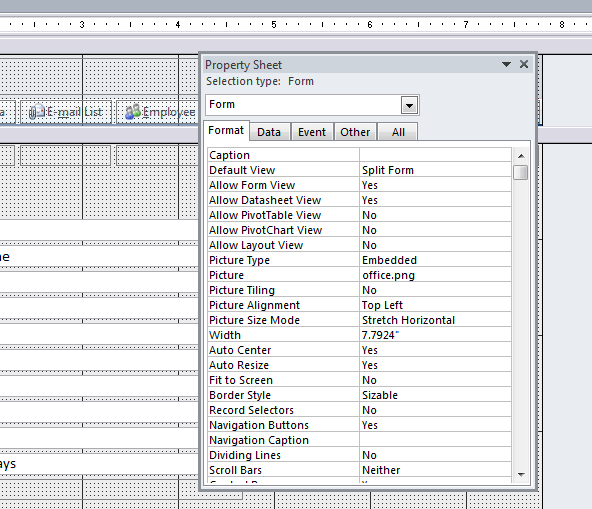
    propsheetYup. If you go into the Property Sheet of the form in Design mode, you’ll find that it is actually an image that is set up in just the right way to make it look great. The Picture Size Mode is set to Stretch Horizontal which takes the picture and pulls it to either side of the form like Stretch Armstrong. The Picture Alignment is set to Top Left or Top Right (the left or right doesn’t matter since it’s being stretched–it’s the top that’s the important part)

    Which gives you a really nice way of making the form look good, right?

    Except…wait…how do I get a copy of the image?

    It was like know the secret of how to make fire, without have any tinder to start it. All I needed was the picture, and I would be able to give my form that look the says “A professional did this, not my nine-year-old.” Except I couldn’t. I saw that the file in the Property Sheet was called “office.png”. I scoured the web looking for a similar image and came up with bupkis.

    This is where the forum post came in. (I’ll keep looking around for it and if I find it, I’ll update this post with a link back.) The post suggested using a capture tool of some sort (like the Windows Snipping Tool, or SnagIt) to grab a small part of the screen when the form is running. Save that snip, then use it as the embedded image in the form.

    Oh boy oh boy oh boy oh boy! (I’m easily excited at times.)

    CaptureI did exactly that, grabbing this image to my left. I then set the properties of my new form the same way I found them in the Microsoft template. I worked like a charm.

    Capture3There are some caveats that go with this:

    • If you’re going to capture the image, you’re obviously stuck with whatever color scheme you’re grabbing.
    • Because it’s an image, you’re stuck with whatever height you’re grabbing. A nifty way around that would be to extend the upper part of the image with some type of cloning tool that you can find in Adobe Photoshop. But that’s getting toward a lot of work for a minor visual display.

    That’s it. Have fun with your forms.

  • Book Review: “Going Clear”, by Lawrence Wright

    February 9th, 2015

    GoingClearCoverHaving taken most of December and January off from blogging, it’s time to get back to it. What better way to start than with a book review. And a humdinger of a book it is.

    You may have heard of Lawrence Wright’s investigation into the Church of Scientology. His book “Going Clear” is the result of a long-form journalism article that appeared in the New Yorker that told the story of Paul Haggis’s very public exit from the Church. Paul Haggis, for those who don’t know, is a screenwriter and director, most well-known for writing and directing the movie “Crash”. Additionally, you may have heard of the documentary “Going Clear”, directed by Alex Gibney. It is due to air on HBO on March 16th, after making a big splash at the Sundance Film Festival this past year. The documentary is inspired by Wright’s book.

    The book itself continues to use Paul Haggis as it’s central core around which the rest of the narrative revolves. Haggis’s early experience with the Church open the book, and after a lengthy but necessary detour exploring the life and times of L Ron Hubbard, who founded the Church, and David Miscavige, who took over from Hubbard once Hubbard was no longer well enough to run the Church, the narrative returns to Haggis.

    One of the great difficulties of writing on this topic, prior to Haggis’s departure and afterward, is the lack of information about the inner workings of the Church of Scientology. The Church, which goes out of its way to maintain its secrecy, has ttired to tightly control information about its inner workings. There is, therefore, very little documentation from which can be drawn an investigation. Wright uses, as his sources, many ex-Scientologists, which have given harrowing accounts of what life inside the Church is like; official public documents, such as the Naval records of Hubbard from his time in the service during WWII; leaked scriptural content, which ex-Scientologists have managed to smuggle out of the Church as they made their escape; and the few books and investigative articles that have come before. Interestingly, for this last category, there are very few. The reason is because the Church makes a deliberate effort to undermine these kind of investigations, and, failing that, harass the authors with private investigators, lawsuits, and even framing them for felony crimes.

    profile-LRHBecause limits that the Church will go to in order to protect itself seem to be boundless, this book becomes a page-turner of a story, enumerating the actions the Church has taken over the years against individuals, businesses, and even an enormous government bureaucracy (the IRS). The founder of the Church of Scientology, the prolific science-fiction writer L Ron Hubbard, is presented in a manner that show him to be at best a pathological liar and at worst a paranoid schizophrenic. The current leader, David Miscavige, is portrayed as a tyrant rivaling some recently toppled despots, who is willing to use humiliation, degradation, and even physical violence and abuse to get what he wants.

    In recent years, a number of stories about the inner workings of the Church have come to light. Stories of a place called the Hole, a set of un-air-conditioned trailers sitting in the dessert with bars on the windows and security guards at the door. Stories about how church members have been made to lick toilets clean or subsist off of leftover table scraps or sleep on floors covered with ants. What’s amazing is that these Church members are typically high-ranking members of the Church’s leadership whose only sin was to land on the wrong side of Miscavige’s ire. Additional stories have emerged from former Scientologists themselves, on sites such as exscientologykids.com.

    When taken as the sum of its parts, the book never truly decides what it wants to be, which may its only significant flaw. It is a compelling read, and it’s easy to see why it was a finalist for the Nation Book Award. But there is a lot of stuff going on inside its 450+ pages, all of which relevant, all of which, when woven together tell a helluva yarn, none of which take a specific stand. Perhaps good journalism is like that, letting the reader determine the stand they must take. As such, “Going Clear” is part expose on human rights abuses, part biography of the charismatic and troubled founder, part investigation as to why Hollywood is so fascinated (some would argue “taken in” or “hoodwinked”) by the Church. Many people these days outside of the Church are most familiar with Scientology based on interviews celebrities such as Tom Cruise has given, where his defense of the Church has been oddly aggressive. Wright’s book shows that interior of Scientology is much darker, and it’s perceived weirdness much deeper than what most readers know. If anything, Wright’s book is as concise a history of the Church of Scientology as one is likely to find outside the church’s officially blessed and released histories.

    It is in the epilogue where Wright’s investigation (the Church might in fact describe the investigation as “muckraking”) transcends the the rest of the book. He never offers an indictment of the Church, though, if even half of the stories that ex-members tell are true, then one is certainly warranted. He also never truly defends them. The epilogue is where he comes the closest, holding the Church of Scientology and all of its troubling history and downright bizarre space-opera cosmology up against other profoundly popular and recent theologies. The most obvious is the Church of Jesus Christ of Latter-day Saints, otherwise known as the Mormons, who believe in a third book of the holy scriptures known as the Book of Mormon, a scripture based on an ancient set of holy tablets found right here in the good ol US of A. He compares Scientology, rightly or wrongly, to both cults and ancient religions such as Buddhism and Christianity. The Reverend Jim Jones, another charismatic leader, led hundreds to their death at their own hands in Guyana. Christianity, in its early days, was persecuted by the Romans who must have thought that the idea of a single god was absolutely bonkers. In both cases, as with active Scientologists, their belief is absolute. What any and all faiths rely on is that very word itself: “faith”. There are always going to be aspects of faith that are un-proveable. An atheist demands proof, which he will never get, and the believer believes blindly, never questioning whether that which he believes is maybe just a little bit crazy. In comparing Scientology to other faiths, creeds, and cults, Wright wraps up his book on a high note, reminding us without chastising us that matters of human rights abuses must certainly be addressed. Matters of individuals faith is really no one else’s business.

←Previous Page
1 … 26 27 28 29 30 … 41
Next Page→

Create a website or blog at WordPress.com


Loading Comments...
 

    • Subscribe Subscribed
      • Scott Lyerly
      • Join 200 other subscribers
      • Already have a WordPress.com account? Log in now.
      • Scott Lyerly
      • Subscribe Subscribed
      • Sign up
      • Log in
      • Report this content
      • View site in Reader
      • Manage subscriptions
      • Collapse this bar